HomeHardwareFeatures
The new Nvidia Image Scaling is no DLSS, but boosts performance in any gameNo dev implementation or RTX graphics card required
No dev implementation or RTX graphics card required
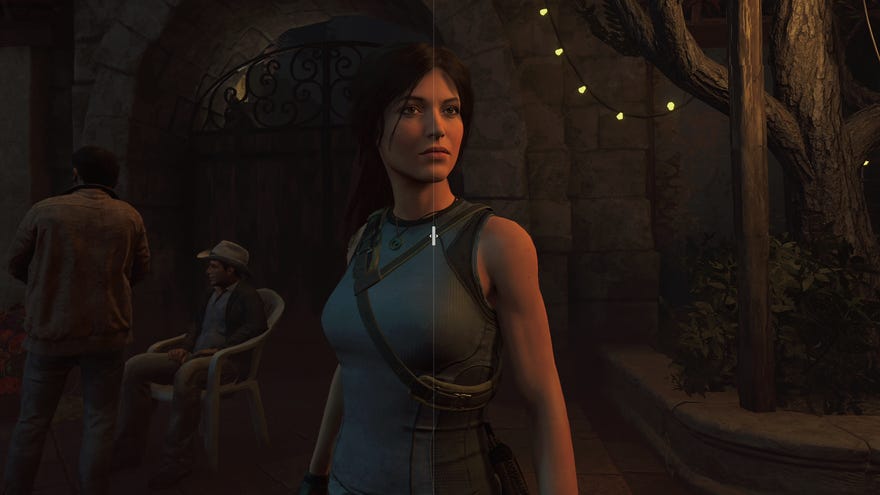
Nvidia have launched a revamped Image Scaling feature that aims to provide aDLSS-style performance boost in your games – as well as ICAT, a new screenshot and video comparison tool that will let you see the difference for yourself.
Alright, so this new Image Scaling feature – an updated and upgraded take on the Image Scaling tool that’s been nestled within Nvidia Control Panel since 2019 – isn’t quite DLSS Lite, as it lacks any kind of AI/machine learning smarts. With its new upscaling algorithm, though, it is a lot like AMD’s rival FidelityFX Super Resolution (FSR): a spatial upscaler that applies an adjustable sharpening filter in the same pass. It still involves rendering games at a lower-than-native resolution to improve performance, then upscaling the image until it looks more or less like it’s running at native.
Battlefield 2042 Gameplay with NVIDIA Reflex and DLSSWatch on YouTube
Battlefield 2042 Gameplay with NVIDIA Reflex and DLSS
The biggest adverse differences between Image Scaling an DLSS as that the former doesn’t include its own anti-aliasing, instead upscaling the image using whatever AA was built into the game, and that it doesn’t get smarter about applying its effects over time. However, unlike DLSS – and indeed, FSR – Image Scaling works on any game, not just those the developers have added support for. You don’t even need one of thebest graphics cardswith all the RTX gubbins – any Nvidia GPU from the Maxwell family onwards (GTX 745 or better, basically) will work. Download the Gamer Ready 496.70 driver (out today), and you can enable it as a global or per-game setting in Nvidia Control Panel.
ICAT, or Image Comparison and Analysis Tool, is also free to download fromNvidia. Y’know those sliding screenshot comparison widgets you see on sites with bigger production budgets than RPS? You can now have something just like that on your very own PC. I love it, and heartily recommend installing it if you want to test out different graphics settings yourself, but is Image Scaling also worth using? Let’s find out, with a little help from ICAT.
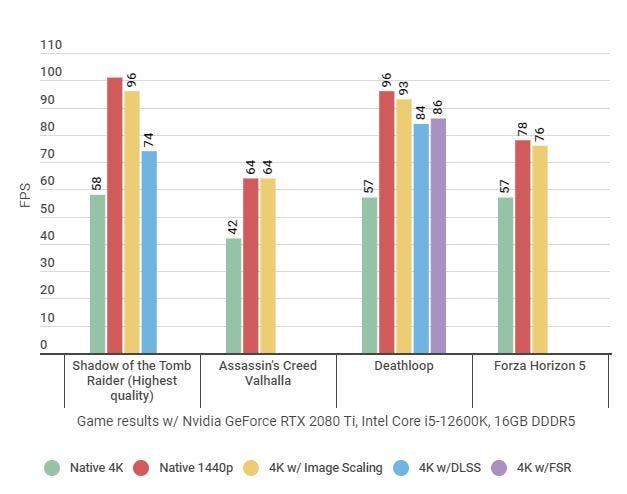
In every game I tested, I ended getting identical or only very slightly lower performance to when using native 1440p with Image Scaling off – so significantly more frames than using native 4K. The particular settings I was using are apparently close to how FSR works on its second-highest ‘Quality’ setting, but Image Scaling outpaced both that and ‘Balanced’-quality DLSS inDeathloopas well.
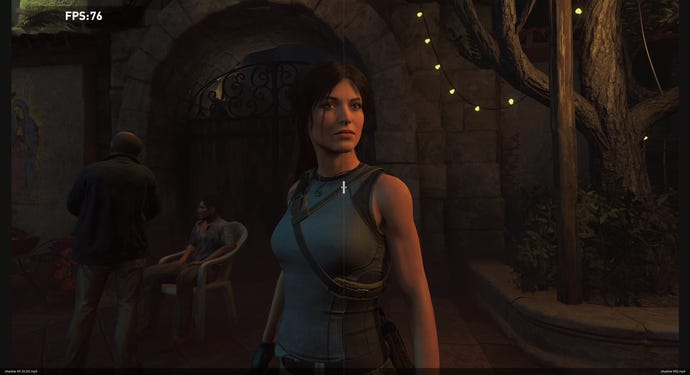
Left: Native 4K. Right: 1440p (Image Scaling to 4K, 67% sharpness).
There were even some environmental details where Image Scaling’s integrated sharpening (I had this set to 67% at Nvidia’s recommendation, you can change it freely) made it appear even more detailed than DLSS, like on these ancient stairs. Overall sharpness and motion handling remain better on DLSS, but given its strength lies in its ability to maintain fine details through the upscaling process, you’d think it would beat Image Scaling more comprehensively.
Left: 4K (DLSS on). Right: 1440p (Image Scaling to 4K, 67% sharpness).
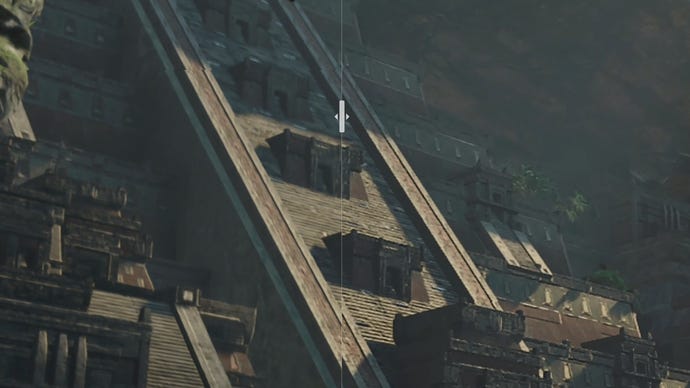
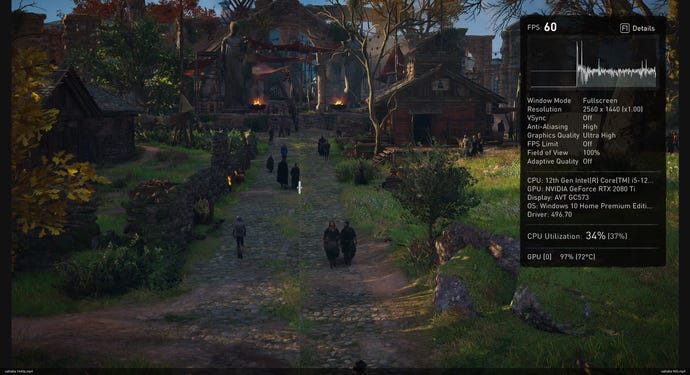
Image Scaling also stood up well to native 4K inAssassin’s Creed Valhalla. Not better, but close enough that I’d gladly take an extra 22fps for it. It’s certainly a lot closer to native 4K than how the game looks at 1440p, which remember, is the resolution it was actually rendering at before upscaling
Left: Native 1440p. Right: 1440p (Image Scaling to 4K, 67% sharpness).
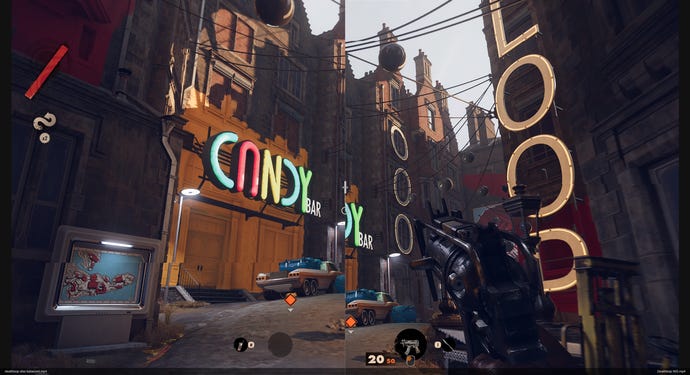
At this point it’s safe to say that if the game you’re playing supports neither DLSS nor FSR, Nvidia Image Scaling is at least worth trying out. But what if it supports both? In Deathloop, DLSS proved the upscaling tech to beat – besides smoothing out jagged edges more effectively than Image Scaling, it demonstrated a drawback of the latter’s reliance on a sharpening filter. While this can help deal with the blurriness that arises from spatial upscaling, sharpening can also make object edges look overly dark, or give surfaces an odd grainy look. In Deathloop, the effect isn’t ruinous, but certain details do look more naturalistic with DLSS. This Balanced DLSS as well, so the difference would be even starker when using the superior ‘Quality’ setting.
Left: 4K (Balanced DLSS). Right: 1440p (Image Scaling to 4K, 67% sharpness).
Against FSR, Image Scaling has more of a fair fight, though I personally slightly prefer AMD’s tech here. Again, Image Scaling seems to have an anti-aliasing disadvantage, and while some very distant details are easier to make out with Image Scaling, the extra jaggies are a considerably trade-off.
Left: 4K (Quality FSR). Right: 1440p (Image Scaling to 4K, 67% sharpness).

Ultimately, I reckon that if you have an RTX 20 series graphics card or newer, you’re best off sticking with DLSS whenever it’s available. You can actually have both DLSS and Image Scaling’s sharpening component active at the same time, though I tried this in Deathloop and wasn’t a fan of the added filter; with some exceptions, like those Tomb Raider stairs, DLSS is sharp enough as it is.
I don’t think this is going to kill off FSR either, though it will provide AMD’s upscaler with some healthy competition (at least for Nvidia card owners; for AMD Radeon fans, FSR remains the only option). If the sharpening filter looks too strong, you can always tone it down as well – there are sliders both in Nvidia Control Panel and in GeForce Experience.
I should also note the one and only technical hiccup I encountered while testing Image Scaling. The optional ‘NIS’ overlay, which can sit in the screen corner in-game and is colour-coded to show whether upscaling or just the sharpening filter is in effect, didn’t appear inForza Horizon 5. The effects themselves worked, I just didn’t get the overlay to confirm.
Don’t be afraid of trying it out, mind. A game-agnostic upscaler was an admirably ambitious idea in 2019, and with this update to Image Scaling, Nvidia has produced something broadly as good as FSR – and definitely as capable of boosting your frame rate in a pinch.
Update: our guide onhow to use Nvidia Image Scalingwill walk you through setting it up!
