HomeHardwareReviews
Nvidia GeForce RTX 4090 review: A wildly expensive flagship GPU with a touch of DLSS 3 magicThe biggest, brawniest, and most bankrupting of Nvidia’s Ada Lovelace graphics cards
The biggest, brawniest, and most bankrupting of Nvidia’s Ada Lovelace graphics cards

You probably already knew if you were willing and able to buy the Nvidia GeForce RTX 4090 after seeing itsprice announcement, so here’s a short version of the following review: Yes, on pure performance it’s thebest graphics cardfor 4K you can get. Yes, DLSS 3 is the real deal. And no, neither of those make the RTX 4090 good value for money, even if it makes a compelling argument for Nvidia’s latest upscaling tech.
The Zotac Gaming GeForce RTX 4090 Amp Extreme Airo model that I’ve used for testing costs£1960/$1700; both substantial premiums, especially in the UK, on the already lofty RTX 4090 base RRP/MSRP of £1679 / $1599. To many, if not most PC owners, that ALL probably looks like unfathomable riches. Especially with the fastest Nvidia GPUs of the last generation, theRTX 3090andRTX 3090 Ti, now going for less than £1100 and £1200 respectively.
Cd Projekt Red Are Making A New Witcher Trilogy, A Sequel To Cyberpunk 2077 & MoreWatch on YouTube
Cd Projekt Red Are Making A New Witcher Trilogy, A Sequel To Cyberpunk 2077 & More

It’s a high-maintenance component, then, though at least the specs are appropriately monstrous. The RTX 4090 packs in 16,384 CUDA cores, over 6,600 more than the next-bestRTX 4080 16GB. It also overkills the VRAM even harder, with 24GB of 384-bit GDDR6X, and on this model, Zotac has upped the boost clock speed from 2520MHz to 2580MHz. A small overclock, but then remember that the RTX 3090 Ti has about 5,600 fewer CUDA cores, and only boosted them to 1860MHz at stock.This is dumb. Do not do this.
This is dumb. Do not do this.

Then there are the less listable specs, like the underlying upgrades that form the RTX 40 series’s Ada Lovelace architecture. All RTX 40 GPUs get these, not just the RTX 4090, but with redesigned RT cores and Tensor cores promising enhanced ray tracing performance and improvedDLSSperformance, it’s clear that Nvidia doesn’t just want faster framerates in traditional rasterised games. The graphics megacorp is also taking its AI machine learning further than ever with DLSS 3, a distinct new upscaler that can pump out bigger FPS boosts than previous DLSS versions could ever hope for. In specific, supported games, of course.
Nvidia GeForce RTX 4090 review: 4K performance
More on that to come, but first, here’s the core performance lowdown on the RTX 4090’s favourite resolution.
Thanks to the higher-end GPUs in the RTX 30 and AMD Radeon RX 6000 series, you already have a range of graphics card options for hitting 60fps at 4K without sacrificing much in terms of settings quality. Even so, the RTX 4090 represents a truly generational leap, averaging 100fps or above in all but a couple of our rasterised (non-ray traced) benchmarks. And even where it didn’t, it still put in record-setting scores, like 79fps inCyberpunk 2077and 84fps inWatch Dogs Legion.
The latter is 14fps higher than what the RTX 3090 Ti managed, which might disappoint given the price difference. But the RTX 4090 stomped all over the Ampere GPU elsewhere, especially in the demandingTotal War: Three KingdomsBattle benchmark. On Ultra quality, the RTX 4090 cruised to 100fps, a 40fps advantage over the RTX 3090 Ti. That should please anyone who owns one of thebest 4K gaming monitorswith a 120Hz or 144Hz refresh rate.
Shadow of the Tomb Raideralso saw a big jump, from 75fps on the RTX 3090 Ti (on the Highest preset with SMAA x4 anti-aliasing) to 125fps on the RTX 4090. That’s a 67% improvement!Assassin’s Creed Valhallaalso got a respectable boost from 73fps to 100fps, whileHorizon Zero Dawnclimbed from 98fps to 127fps on Ultimate quality.

Metro Exoduswas another big win for the RTX 4090, with it turning out 107fps on Ultra quality; 24fps faster than the RTX 3090 Ti.Hitman 3’s Dubai benchmark also had the RTX 4090 racking up a blazing 174fps average on Ultra quality, though since the RTX 3090 Ti scored 135fps in the same settings, you’d need a 240Hz monitor and eagle eyes to tell the difference there.
It’s also worth noting that inForza Horizon 4, both GPUs actually scored evenly: 159fps apiece. That suggests that the two cards were in fact bumping up against the limits of the test PC’s Core i5-11600K CPU, so between that and the game being four years old at this point, I’m probably going to phase it out of our benchmarking regimen in favour ofForza Horizon 5. I don’t have RTX 3090 Ti results for that but the RTX 4090 did average 111fps on the Extreme preset, so it’s evidently still capable of liquid smooth framerates even with the sequel’s tougher technical demands.

Ada Lovelace’s ray tracing optimisations – which also include a new “Shader Execution Reordering” feature that lets RTX 40 GPUs crunch the numbers on RT rendering more efficiently – do indeed bear fruits as well. TakeMetro Exodus: with both the Ultra preset and Ultra-quality ray tracing, the RTX 4090 averaged 80fps, or a 25% drop from its non-RT performance. The Ampere-based RTX 3090 Ti? That dropped from 83fps to 53fps with RT, a 36% loss. So not only is the RTX 4090 much faster with ray traced effects in a straight FPS race, but these fancy visual upgrades also levy a proportionally lower tax on overall performance.
The same was true inWatch Dogs Legion, where adding Ultra-quality RT effects dropped the RTX 4090 from 84fps to 58fps and the RTX 3090 Ti from 70fps to 39fps. That’s a 31% reduction for the newer GPU, and a 44% reduction for the older one.
I won’t say Nvidia have completely cracked ray tracing – we’ll have to wait for more affordable RTX 40 cards to see if that’s really true – but their success in cutting down its FPS cost is encouraging.

Nvidia GeForce RTX 4090 review: 1440p performance
Dropping the resolution to 2560x1440 presents another performance oddity. 1440p isn’t exactly where the RTX 4090 sees itself in five years, but then why is it sometimesslowerthan the RTX 3090 Ti at this res? 163fps inForza Horizon 4isn’t just merely 4fps faster than it was at 4K, but it’s 16fps slower than the RTX 3090 Ti managed with the same Ultra settings. Final Fantasy XV was off as well, averaging 111fps with the vanilla Highets setting and 84fps with all the extra Nvidia settings enabled. That’s 9fps and 3fps behind the RTX 3090 Ti respectively, with both results only 3-4fps higher than at 4K.
Of all the games I tested, only two –Shadow of the Tomb RaiderandAssassin’s Creed Valhalla– really showed a big uptick in 1440p performance. That includes SoTR with Ultra-quality ray tracing: with this engaged alongside SMAA x1, the RTX 4090’s 145fps easily outran the RTX 3090 Ti’s 128fps. Over in Assassin’s Creed Valhalla, 1440p on the Ultra High preset allowed for the RTX 4090 to reach a 130fps average. On 144Hz monitors, that will look even slicker than the RTX 3090 Ti’s 103fps.

Not that these make up for the RTX 4090 struggling with 1440p elsewhere. I’ve tried rebooting, reinstalling, verifying caches, measuring thermals, monitoring power usage and more to ascertain if this was an outright technical problem, all to no avail. That leaves CPU bottlenecking as the most likely cause, but then if that was the deciding factor, why could the RTX 3090 Ti sometimes shift more frames on the same Core i5-11600K?
(Side note: the RTX 4090 does need a lot of power, but at least on this Zotac model, that energy usage doesn’t result in excessive heat. During benchmarking, GPU temperatures generally stayed between 50°c and 60°c, with couple of very brief peaks at 70°c.)
Nvidia GeForce RTX 4090 review: DLSS 3
Mysteries aside, whatcouldmake it more tempting to splash out is this card’s DLSS 3 support. I intend to put together a more detailed guide to this in the future, as right now it’s only test-ready in a handful of software, but what I’ve seen of DLSS 3 in Cyberpunk 2077 is mightily convincing.

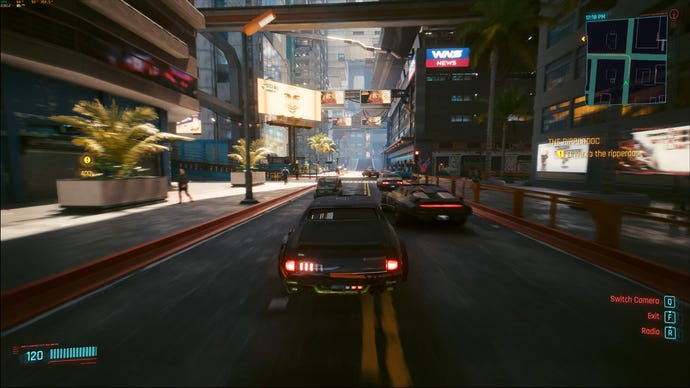
The ‘fake’ frames usually look surprisingly accurate, too. My main experience with AI art is comprised of scrolling past anatomically abominable JPGs on Twitter, but DLSS 3 does a reasonable job at drawing data from surrounding, ‘real’ frames to generate its own. Here’s a fake frame from some Cyberpunk 2077 footage I recorded, along with the traditionally rendered frame that immediately followed it:
3840x2160, High textures, Psycho RT, DLSS 3 Quality, AI generated frame
3840x2160, High textures, Psycho RT, DLSS 3 Quality, rendered frame
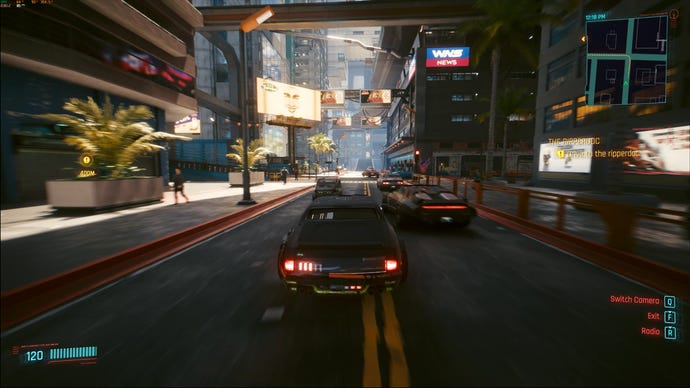
Having trouble playing spot the difference? Here’s both of them zoomed in using Nvidia ICAT:
Left: generated frame. Right: rendered frame
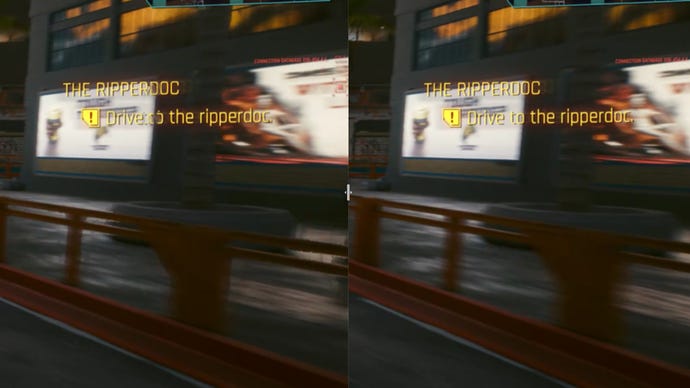
Yep, only thing wrong in this AI-generated scene is the occasional bit of mushy UI. And to stress, this tiny imperfection is as bad as it gets when there are no sudden changes or camera cuts. Most fake frames look even more like the real thing, and since so many frames are appearing per second, it’s essentially impossible to spot little differences like this when the game is in motion.
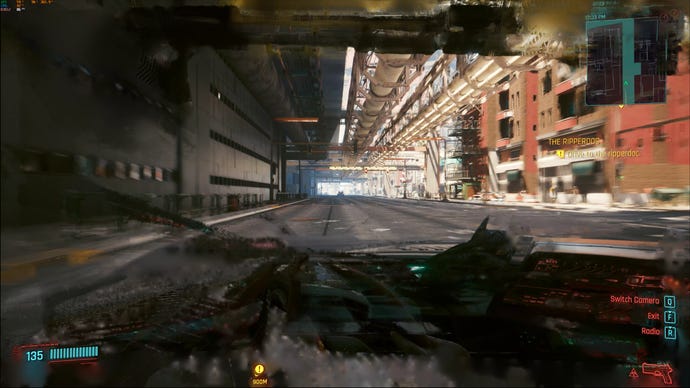
Hell, it’s hard to spot when therearebig differences. The frame generation’s weakness is sudden transitions: when the on-screen image is completely different to the previous frame. This generated frame, for instance, came immediately after I changed the driving camera position:
3840x2160, High textures, Psycho RT, DLSS 3 Quality, AI generated frame
There is one actual drawback, in that frame generation inflicts a higher input lag increase than ‘standard’ DLSS. You also don’tfeelthe AI-added frames in the sense of control smoothness - it’s a purely visual upgrade - so I can’t see it catching on with twitchy shooters. Cyberpunk at 100fps-plus does look grand, but to me, aiming and driving felt closer to how it would at 60fps.
Still, I don’t think that’s a ruinous problem for DLSS 3. Games like your Counter-Strikes and your Valorants and your Apex Legendseses are built to run smoothly on much lower-end GPUs, so something like an RTX 4090 would provide more than enough frames without the need for upscaling in the first place. And every game with DLSS 3 support also has Nvidia Reflex built in, and its whole purpose is to reduce system latency - so the lag is, at least, kept under control. And Cyberpunk felt smooth enough to me - mouse and keyboard controls that feel 60fps-ish are hardly sluggish, and remember that other, less demanding games will produce more ‘real’ frames, so will seem even smoother.

As for the RTX 4090 specifically, I can at least see the point of it. I couldn’t do the same with the RTX 3090 Ti: when that GPU launched, it was majorly more expensive than the RTX 3090 despite being only slightly faster. Although the RTX 4090 makes even wilder demands of your finances, it’s also a significantly better 4K card, regularly surpassing 100fps on max-quality rasterised performance and 60fps with ray tracing. Add DLSS 3, and it’s the truly imposing PC conqueror that the RTX 3090 Ti never was.
And yet…how much?For a GPU that gets confused and upset running at resolutions below 4K, and seems to have trouble with older DLSS versions unless it’s paired with similarly bleeding-edge CPU? There might be a tiny core of enthusiasts hungry for the best performance at any cost, but for everyone else, the RTX 4090’s barriers to entry will rule it out as a serious upgrade option.
To my fellow members of the great un-rich, though, all is not lost. The most appealing thing here is clearly DLSS 3, and although it’s the preserve of the RTX 4090 and two RTX 4080 variants for now, more affordable RTX 40 GPUs are surely on the way. Give it a few months and you should be able to enjoy the best part of the RTX 4090’s architecture without needing to sell your bone marrow to afford it.
