HomeGuidesMinecraft
Minecraft Banner designs: the best Banners we’ve found, and how to make your ownThere are some seriously cool Minecraft Banner designs out there
There are some seriously cool Minecraft Banner designs out there
Want to learn how to create the most amazing Banner designs in Minecraft?You’re not alone. Designing a Banner is an incredibly finnicky and complex task, and there’s a fair amount to understand about how to make and design a Banner. Since the1.18 updatewon’t bringDripstoneinto Minecraft until later this year, you have plenty of time to learn.
Below we’ll walk you through a dozen of thebest Minecraft Banner designswe’ve come across. After that we’ll teach you how to craft your own Banner from scratch, and explain how to use Looms, Banner Pattern items, and more.
The Best Minecraft ShadersWatch on YouTube
The Best Minecraft Shaders

Best Minecraft Banner designs
The Banner crafting system is quite restrictive compared to, say, designingMinecraft skins. Each banner illustration can only be created from a maximum of 6 patterns of different colours overlapping one another. But unsurprisingly, over the years the playerbase has found ways to create some absolutely marvellous banner designs that you can use to adorn yourcastlesandtowers.
Below we’ll walk you through how to create your own banners and designs. But first, we’ll walk you through some of the best Minecraft Banner designs we’ve found in theMinecraft Banner Gallery. You can follow the links below to learn how to create each one from scratch; or if you’re in Creative Mode or havecheats enabled, you can type the corresponding Banner code into the chat to summon that exact Banner into your inventory.
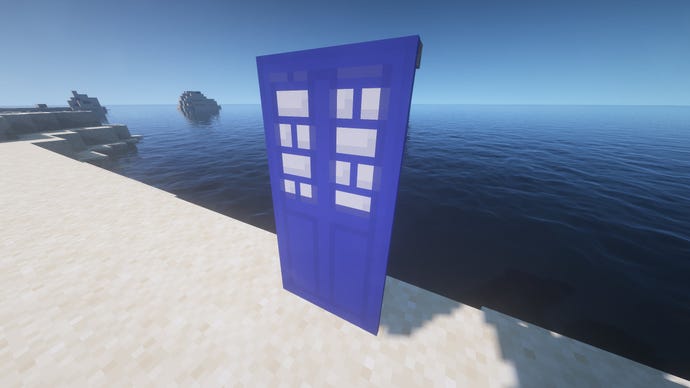
TARDIS Banner
If only you could open Banners with a snap of your fingers. This TARDIS Banner is one of the most popular Banner designs ever, and it’s easy to see why. It’s a near-perfect replica of an incredibly recognisable sight for anyone who’s ever even glanced sidelong at the TV during an episode of Doctor Who. It’s also a symbol of exploration and discovery if I ever saw one, which matches wonderfully with the prospect of discovering anew Minecraft worldfor the first time.
Learn how to make this banner from scratchhere.
Banner code:/give @p minecraft:blue_banner{BlockEntityTag:{Patterns:[{Color:0,Pattern:“bri”},{Color:11,Pattern:“hhb”},{Color:15,Pattern:“sc”},{Color:11,Pattern:“sc”},{Color:15,Pattern:“bo”},{Color:11,Pattern:“bo”}]}}
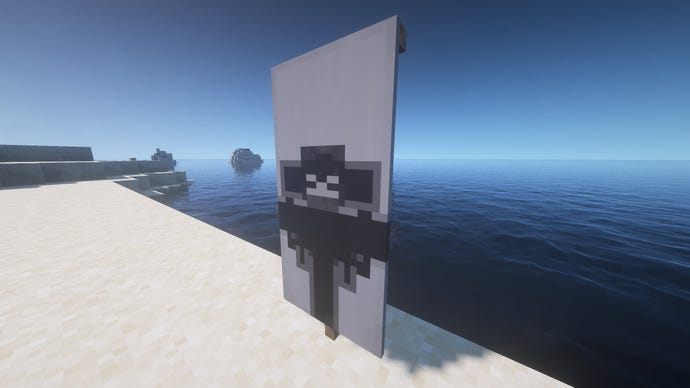
Wither Banner
Learn how to make this banner from scratchhere.
Banner code:/give @p minecraft:light_gray_banner{BlockEntityTag:{Patterns:[{Color:15,Pattern:“hhb”},{Color:8,Pattern:“bs”},{Color:15,Pattern:“cs”},{Color:8,Pattern:“hh”},{Color:15,Pattern:“cre”},{Color:15,Pattern:“sku”}]}}
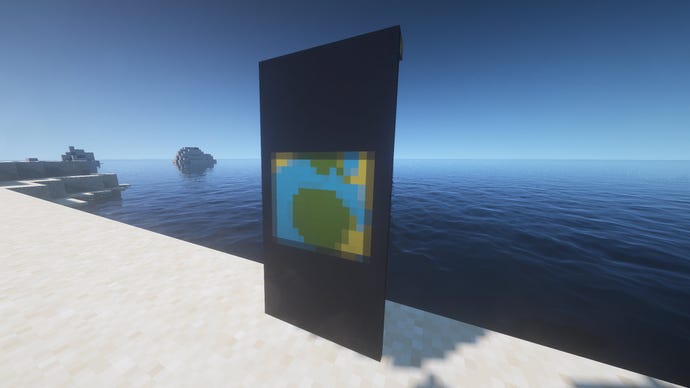
Planet Banner
This Banner uses up all six layers to mesh together blue, yellow, and green into a startlingly convincing planet; albeit a square one rather than a circular one - which I think actually makes more sense in a Minecraft world, not less.
Learn how to make this banner from scratchhere.
Banner code:/give @p minecraft:yellow_banner{BlockEntityTag:{Patterns:[{Color:13,Pattern:“mr”},{Color:3,Pattern:“moj”},{Color:15,Pattern:“bo”},{Color:15,Pattern:“bs”},{Color:15,Pattern:“ts”},{Color:15,Pattern:“gru”}]}}
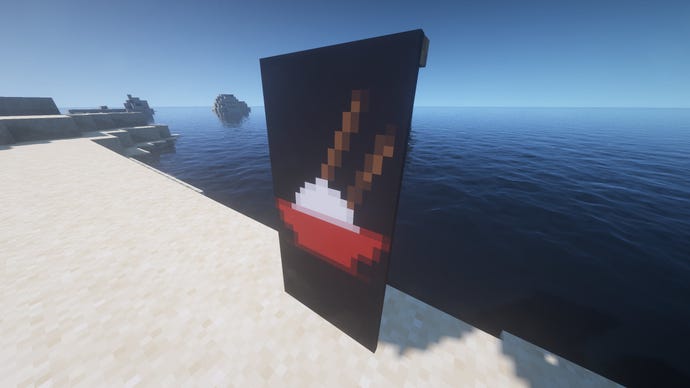
Bowl of Rice Banner
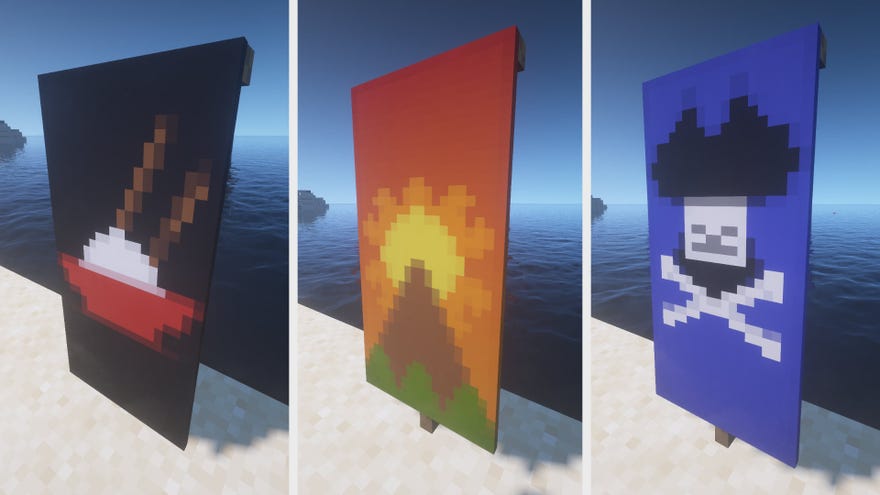
Probably my favourite Banner on this list. I mean, there is absolutely no mistaking that bowl of rice for anything else. The chopsticks are a masterpiece, and make this Banner recognisable even from a distance. A definite must-have Banner for lovers of rice.
Learn how to make this banner from scratchhere.
Banner code:/give @p minecraft:black_banner{BlockEntityTag:{Patterns:[{Color:12,Pattern:“dls”},{Color:15,Pattern:“cr”},{Color:0,Pattern:“mc”},{Color:14,Pattern:“hhb”},{Color:15,Pattern:“cbo”},{Color:15,Pattern:“bs”}]}}
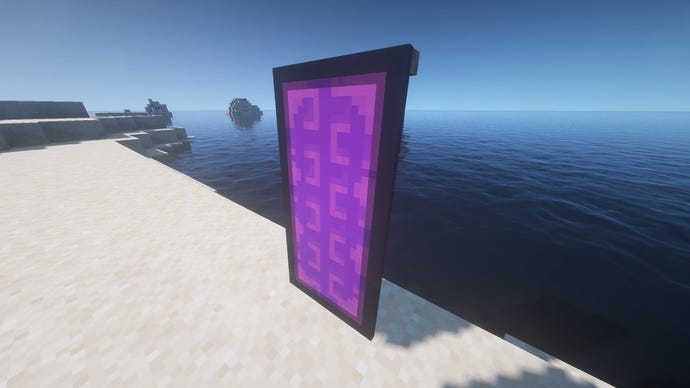
Nether Portal Banner
This bold and striking Nether Portal Banner is already giving me ideas on how to decorate the walls of my next Nether Hub. It’s also one of the simplest Banners to make, requiring just four layers including the black outline. Quite amazing that three simple patterns overlaid can make for such a convincing wibbly-wobbly portal pattern.
Learn how to make this banner from scratchhere.
Banner code:/give @p minecraft:purple_banner{BlockEntityTag:{Patterns:[{Color:2,Pattern:“ss”},{Color:10,Pattern:“bri”},{Color:2,Pattern:“cbo”},{Color:15,Pattern:“bo”}]}}
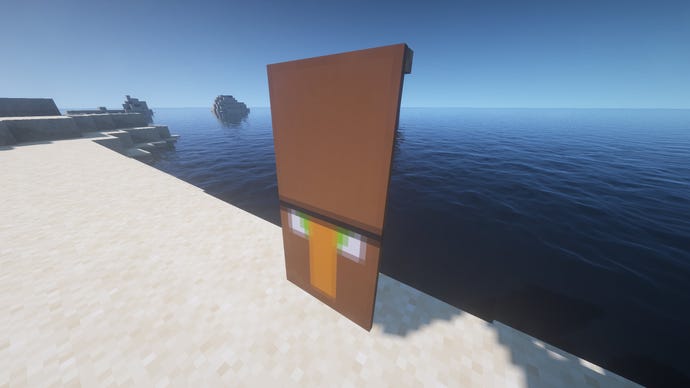
Villager Banner
Another instantly recognisable Banner even from a distance. I reckon if Minecraft Villagers' heads were this big, they’d be able to command a lot more respect. They might not even need Iron Golems to defend theirVillages, were this the case.
Learn how to make this banner from scratchhere.
Banner code:/give @p minecraft:white_banner{BlockEntityTag:{Patterns:[{Color:5,Pattern:“mr”},{Color:12,Pattern:“bs”},{Color:1,Pattern:“cs”},{Color:12,Pattern:“bo”},{Color:15,Pattern:“ms”},{Color:12,Pattern:“hh”}]}}
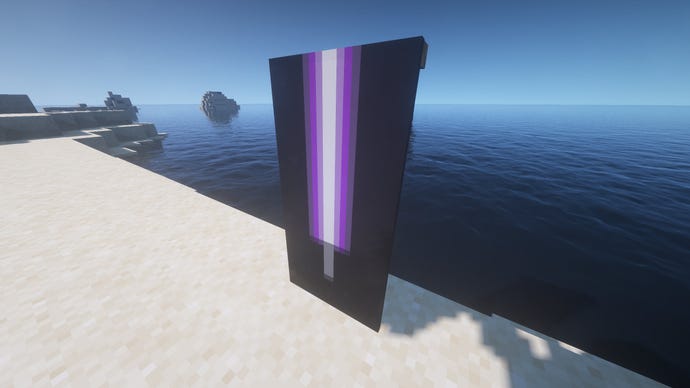
Purple Lightsaber Banner
The moment I saw this Banner it took me back to my childhood days spent playing Jedi Knight: Dark Forces II. The beauty of this design is that you can adapt it to create any colour of lightsaber you wish. But I’m partial to purple, myself.
Learn how to make this banner from scratchhere.
Banner code:/give @p minecraft:white_banner{BlockEntityTag:{Patterns:[{Color:10,Pattern:“ss”},{Color:15,Pattern:“ls”},{Color:15,Pattern:“rs”},{Color:15,Pattern:“bl”},{Color:15,Pattern:“br”},{Color:15,Pattern:“bts”}]}}
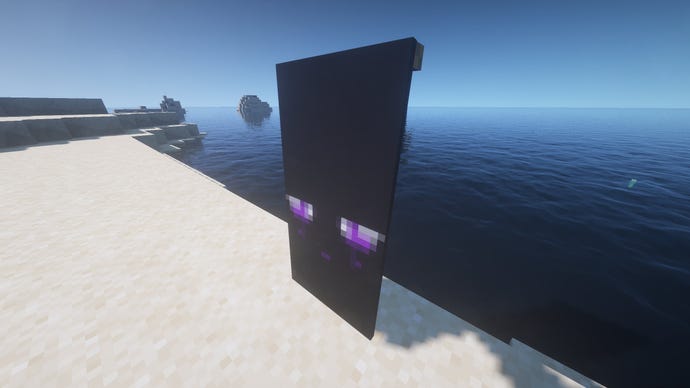
Enderman Eyes Banner
Another amazing and creative use of layered patterns is what makes this Enderman Eyes Banner possible. I mentioned using the previous Nether Portal Banner to decorate a Nether Hub build; I reckon this Banner would be best suited to an End farm, wouldn’t you?
Learn how to make this banner from scratchhere.
Banner code:/give @p minecraft:black_banner{BlockEntityTag:{Patterns:[{Color:0,Pattern:“ms”},{Color:10,Pattern:“flo”},{Color:15,Pattern:“cbo”},{Color:15,Pattern:“cr”},{Color:15,Pattern:“cre”},{Color:15,Pattern:“hh”}]}}
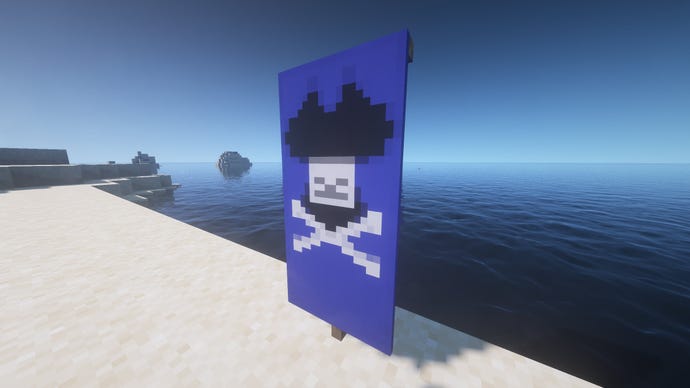
Pirate Banner
It’s very easy to create a simple pirate Banner in Minecraft, given one of the base patterns is a skull and crossbones. What sets this pirate Banenr from the rest is the scarf and hat, both of which look marvellous and give the skull a more intimidating sense of status. As an added bonus, you can also easily change the background colour of this Pirate Banner to whatever you wish.
Learn how to make this banner from scratchhere.
Banner code:/give @p minecraft:blue_banner{BlockEntityTag:{Patterns:[{Color:15,Pattern:“mc”},{Color:0,Pattern:“sku”},{Color:15,Pattern:“ts”},{Color:11,Pattern:“cbo”},{Color:11,Pattern:“tts”}]}}
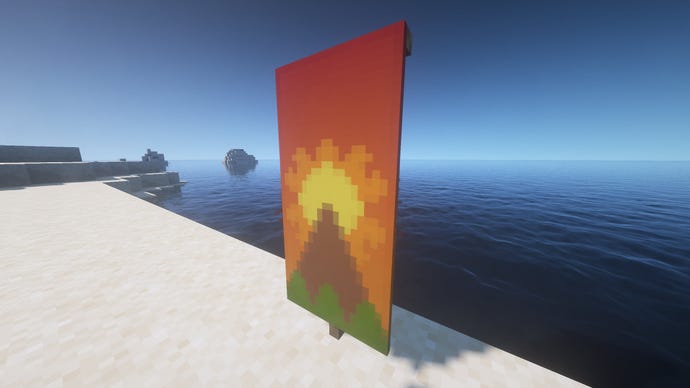
Sunshine Banner
This Banner actually creates an entire landscape out of just 6 well thought out layers, from the trees at the bottom to the towering mountain and the burning sun overhead. It’s a very tranquil and beautiful Banner compared with many others on this list, and a perfect addition to someone’s home.
Learn how to make this banner from scratchhere.
Banner code:/give @p minecraft:orange_banner{BlockEntityTag:{Patterns:[{Color:14,Pattern:“gra”},{Color:1,Pattern:“flo”},{Color:4,Pattern:“mc”},{Color:12,Pattern:“bt”},{Color:13,Pattern:“bts”}]}}
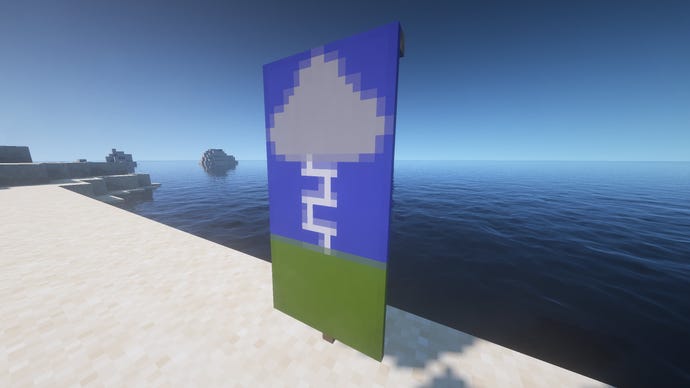
Lightning Storm Banner
A simple idea, very well-executed. This Banner depicts a stormcloud unleashing a single bolt of lightning (which if you look closer is clearly a small section of the brick pattern available in the loom) down onto the ground below. Again I imagine you could have a lot of fun switching around the colours used here. Why not have black lightning on a scorched red ground for an even more dramatic image?
Learn how to make this banner from scratchhere.
Banner code:/give @p minecraft:blue_banner{BlockEntityTag:{Patterns:[{Color:0,Pattern:“cs”},{Color:11,Pattern:“bri”},{Color:8,Pattern:“ts”},{Color:11,Pattern:“cbo”},{Color:13,Pattern:“bs”}]}}
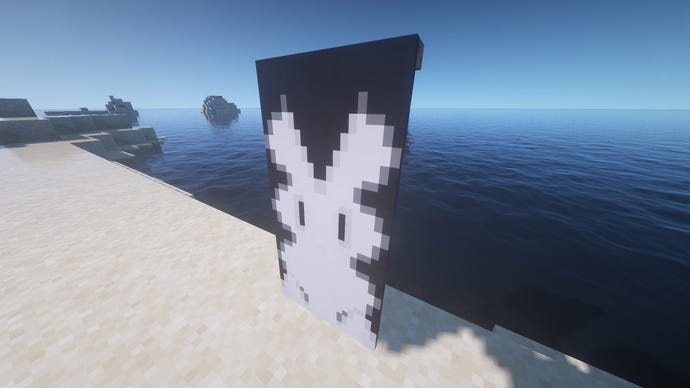
Rabbit Banner
Rouding off our list of favourite Banners is this adorable fluffy white rabbit, which I can’t quite believe it is possible to create using just 6 layers. It’s the ideal Banner for someone who wants to forego the “striking” and “intimidating” route for their Banner, and would like to opt for “cute” instead.
Learn how to make this banner from scratchhere.
Banner code:/give @p minecraft:white_banner{BlockEntityTag:{Patterns:[{Color:15,Pattern:“mc”},{Color:0,Pattern:“flo”},{Color:15,Pattern:“tt”},{Color:0,Pattern:“cr”},{Color:15,Pattern:“cbo”},{Color:0,Pattern:“bts”}]}}
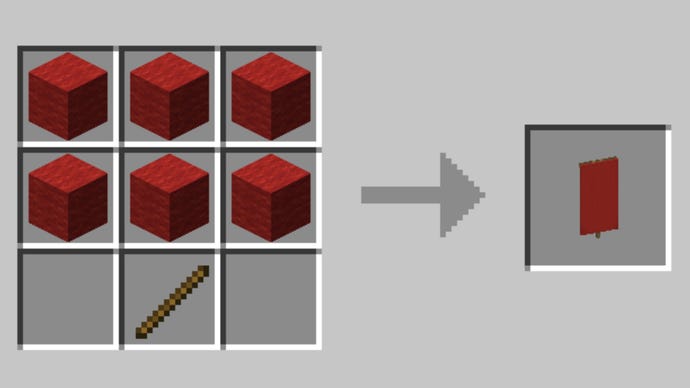
How to make a Banner
To make a Banner, all you need to do is fill the top two-thirds of a Crafting Table grid with Wool blocks of the same colour (the colour you choose determines the Banner colour), and then place a Wooden Stick in the middle tile of the final row.
To duplicate an existing Banner, just pop it into a Crafting grid alongside another blank Banner of the same colour.
How to create Banner designs using the Loom
Place the Loom on the floor, then interact with it to open the Loom window. Place the Banner you wish to alter in the top-left tile, then place a dye of your desired colour next to it.
Once you’ve done this, the window in the centre will fill with numerous pattern types. Select the pattern you wish to use, then retrieve the altered Banner from the output tile on the right-hand side.
You can alter a Banner a maximum of 6 times, and each time the new pattern will overlay what has previously been added to the Banner, allowing you to create interesting meshes of different patterns and colours.
Banner Patterns
Here’s how to create (or find) each of the Banner Pattern items:
That’s everything you need to know in order to start crafting your own fantastic Banner designs in Minecraft. If you’re planning on decorating your new house and need some inspiration, be sure to check out our lists ofMinecraft house ideasandbest Minecraft builds. To provide a change in scenery elsewhere, why not try out some of thebest Texture Packsfor Java andBedrock?
