HomeGuidesStarfield
How to set up a Cargo Link in StarfieldHow to use Cargo Links to transfer resources between your bases in Starfield
How to use Cargo Links to transfer resources between your bases in Starfield
Image credit:Rock Paper Shotgun/Bethesda Game Studios
Image credit:Rock Paper Shotgun/Bethesda Game Studios
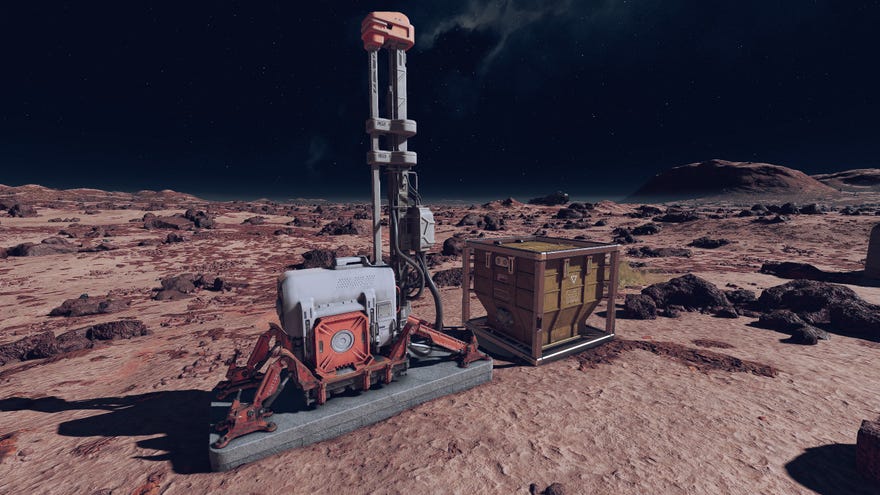
How do Cargo Links work in Starfield?If you’ve finished following ourStarfield outposts guidebut you’re looking for a little more information on Cargo Links, then you’ve come to the right place. There are lots of bountiful planets to find inStarfield, but there isn’t a planet that haseverythingyou need, so you’ll need Cargo Links to ferry things back and forth.Whether it’s fuel, building materials, or something else entirely, you need to shift things from planets where you only have small outposts to anywhere you have a more established base. Cargo Links are a huge quality of life inclusion inStarfieldas a whole, so you’ll want to get some build as soon as you have extractors and power. Here’s what you need to know about Starfield Cargo Links.To see this content please enable targeting cookies.Manage cookie settingsWas Starfield worth the wait? Liam and Alice B discuss this question - and more - in the video above.Watch on YouTubeStarfield Cargo Links explainedCargo Links automatically transfer resources from one planet to another. That’s the TL;DR of what they do, but that doesn’t quite signify their importance if you want to dedicate a lot of time to building outposts. Once you’ve decided which of the best outpost locations to settle down on, and you’ve got more than one outpost created, setting up a Cargo Link should be the next port of call when you’re extracting resources.Image credit:Rock Paper Shotgun/Bethesda Game StudiosThere are two types of Cargo Links in Starfield. The first is a standard Cargo Link, which is cheaper to build and allows you to move resources between two outposts in the same star system. The second type is the Inter-System Cargo Link, which costs more resources to build but allows you to send and receive resources from anywhere in the universe.Image credit:Rock Paper Shotgun/Bethesda Game StudiosOnce you build your first Cargo Link, you must ensure anything you want to send to another planet is linked in the build screen. Then, when you also have a Cargo Link established on the destination planet, you can use the control panel on the source Cargo Link to make a connection. All outgoing resources will appear in one of the storage containers on the Cargo Link - you can also add items here manually - while anything incoming will be in the other storage container.To see this content please enable targeting cookies.Manage cookie settingsTo see this content please enable targeting cookies.Manage cookie settingsThat’s it for the basics of Cargo Links in Starfield - of course, this only details one single Cargo Link connection, but once you start building multiple across your vast network of outposts, you will quickly see how essential they become. Make sure you knowhow to delete an outpostif you run out of slots and want to make one somewhere else. You can also check out our guide on thebest Outpost locations in Starfield.
How do Cargo Links work in Starfield?If you’ve finished following ourStarfield outposts guidebut you’re looking for a little more information on Cargo Links, then you’ve come to the right place. There are lots of bountiful planets to find inStarfield, but there isn’t a planet that haseverythingyou need, so you’ll need Cargo Links to ferry things back and forth.Whether it’s fuel, building materials, or something else entirely, you need to shift things from planets where you only have small outposts to anywhere you have a more established base. Cargo Links are a huge quality of life inclusion inStarfieldas a whole, so you’ll want to get some build as soon as you have extractors and power. Here’s what you need to know about Starfield Cargo Links.To see this content please enable targeting cookies.Manage cookie settingsWas Starfield worth the wait? Liam and Alice B discuss this question - and more - in the video above.Watch on YouTubeStarfield Cargo Links explainedCargo Links automatically transfer resources from one planet to another. That’s the TL;DR of what they do, but that doesn’t quite signify their importance if you want to dedicate a lot of time to building outposts. Once you’ve decided which of the best outpost locations to settle down on, and you’ve got more than one outpost created, setting up a Cargo Link should be the next port of call when you’re extracting resources.Image credit:Rock Paper Shotgun/Bethesda Game StudiosThere are two types of Cargo Links in Starfield. The first is a standard Cargo Link, which is cheaper to build and allows you to move resources between two outposts in the same star system. The second type is the Inter-System Cargo Link, which costs more resources to build but allows you to send and receive resources from anywhere in the universe.Image credit:Rock Paper Shotgun/Bethesda Game StudiosOnce you build your first Cargo Link, you must ensure anything you want to send to another planet is linked in the build screen. Then, when you also have a Cargo Link established on the destination planet, you can use the control panel on the source Cargo Link to make a connection. All outgoing resources will appear in one of the storage containers on the Cargo Link - you can also add items here manually - while anything incoming will be in the other storage container.To see this content please enable targeting cookies.Manage cookie settingsTo see this content please enable targeting cookies.Manage cookie settingsThat’s it for the basics of Cargo Links in Starfield - of course, this only details one single Cargo Link connection, but once you start building multiple across your vast network of outposts, you will quickly see how essential they become. Make sure you knowhow to delete an outpostif you run out of slots and want to make one somewhere else. You can also check out our guide on thebest Outpost locations in Starfield.
How do Cargo Links work in Starfield?If you’ve finished following ourStarfield outposts guidebut you’re looking for a little more information on Cargo Links, then you’ve come to the right place. There are lots of bountiful planets to find inStarfield, but there isn’t a planet that haseverythingyou need, so you’ll need Cargo Links to ferry things back and forth.
Whether it’s fuel, building materials, or something else entirely, you need to shift things from planets where you only have small outposts to anywhere you have a more established base. Cargo Links are a huge quality of life inclusion inStarfieldas a whole, so you’ll want to get some build as soon as you have extractors and power. Here’s what you need to know about Starfield Cargo Links.
To see this content please enable targeting cookies.Manage cookie settingsWas Starfield worth the wait? Liam and Alice B discuss this question - and more - in the video above.Watch on YouTube
To see this content please enable targeting cookies.Manage cookie settings
To see this content please enable targeting cookies.Manage cookie settings
Starfield Cargo Links explained
Cargo Links automatically transfer resources from one planet to another. That’s the TL;DR of what they do, but that doesn’t quite signify their importance if you want to dedicate a lot of time to building outposts. Once you’ve decided which of the best outpost locations to settle down on, and you’ve got more than one outpost created, setting up a Cargo Link should be the next port of call when you’re extracting resources.
Image credit:Rock Paper Shotgun/Bethesda Game Studios
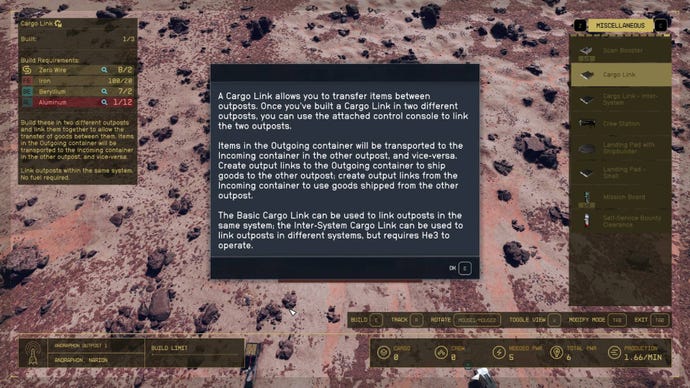
There are two types of Cargo Links in Starfield. The first is a standard Cargo Link, which is cheaper to build and allows you to move resources between two outposts in the same star system. The second type is the Inter-System Cargo Link, which costs more resources to build but allows you to send and receive resources from anywhere in the universe.
Image credit:Rock Paper Shotgun/Bethesda Game Studios
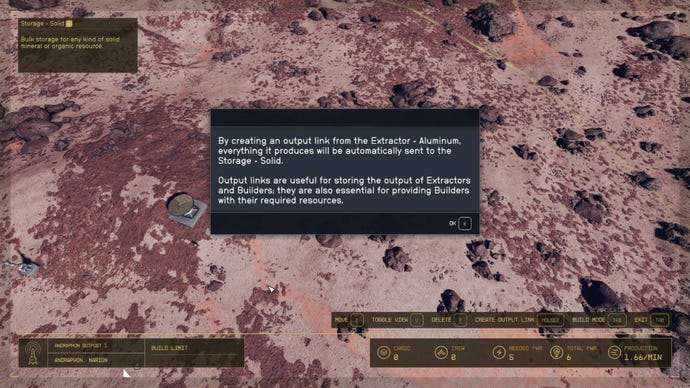
Once you build your first Cargo Link, you must ensure anything you want to send to another planet is linked in the build screen. Then, when you also have a Cargo Link established on the destination planet, you can use the control panel on the source Cargo Link to make a connection. All outgoing resources will appear in one of the storage containers on the Cargo Link - you can also add items here manually - while anything incoming will be in the other storage container.
That’s it for the basics of Cargo Links in Starfield - of course, this only details one single Cargo Link connection, but once you start building multiple across your vast network of outposts, you will quickly see how essential they become. Make sure you knowhow to delete an outpostif you run out of slots and want to make one somewhere else. You can also check out our guide on thebest Outpost locations in Starfield.
