HomeGuidesSuika Game
How to play Suika Game on Nintendo Switch and PCHow to play the Watermelon game Suika on Switch or for free!
How to play the Watermelon game Suika on Switch or for free!
Image credit:Rock Paper Shotgun/Aladdin X
Image credit:Rock Paper Shotgun/Aladdin X

Update:Suika Gameis now available on theUK Nintendo Storeand theUS Nintendo Store, so you no longer need a Japanese Nintendo account in order to play the Watermelon Game! Isn’t that lovely? Below is the original guide.Want to play the Suika game on Switch, or play for free on PC?If you’ve never heard ofSuika, it’s a fun little physics game that popped up back in 2021, and has recently exploded in popularity particularly in Japan, and on Twitch.Suika, also known as the Watermelon Game, is like a cross between 2048 and Tetris, but with physics. You drop fruits into a container, and if two matching fruits touch, they combine into a bigger fruit. The aim is to reach the final fruit (watermelon) and/or last as long as possible before the fruit pile reaches the top of the container.There are a couple of different ways to play the Suika game, and we’ll go over both of them below so you can try out the Watermelon Game for yourself and see what all the fuss is about! Fair warning - it’s annoyingly fun.To see this content please enable targeting cookies.Manage cookie settingsHow to play Suika Game for free on PCIf you want to play Suika Game for free, then there is a browser version of the game available on PC. To try out the free version, go tosuikagame.comand start playing!Bear in mind that the free version of Suika is a little different from the main version of the game on the Nintendo Store. Here are the main differences:The physics are slightly different between the two versions.All the fruits are perfectly round in the browser version.You can’t see the next fruit to be dropped in the browser version.If you want to play the proper version of the Watermelon Game that you’ve seen streamers playing on Twitch, then you’ll need to download the Suika Game on Nintendo Switch.Image credit:Rock Paper Shotgun/Aladdin XHow to play Suika Game on Nintendo SwitchYou can play the real Suika Game on Nintendo Switch. To play Suika on Switch, carefully follow these steps:Create anew Nintendo account.Select Japan for your country of residence.Complete the account creation process..On your Nintendo Switch, Go to “Settings”, then “Users”, then “Add User”.Add a new profile and link it to your new Japanese Nintendo account.Purchase a 500 yen voucher fromAmazonor any respected store.Use your browser’s Translate tool to navigate the site menus more easily.Check your email for the voucher code once it’s purchased.On your Switch, go to the eShop and click on “Redeem Code”.Follow the on-screen instructions to redeem your 500 yen.Return to the eShop and search for “Suika”.Purchase the official Suika Game using your 500 yen.It’s worth noting that 500 yen is actually more than you need to purchase the Suika Game. The game itself only costs 240 yen. Unfortunately, there’s no option to redeem a 240 yen voucher - the lowest amount you can get is 500 yen.Don’t worry though, we’re not talking large sums of money. 240 yen is equal to around £1.32 / $1.60 / €1.51, and 500 yen is equal to around £2.75 / $3.34 / €3.16. It’s of course up to you to decide whether it’s worth overpaying slightly in order to easily get your hands on the yen you need to purchase the Watermelon Game.To see this content please enable targeting cookies.Manage cookie settingsTo see this content please enable targeting cookies.Manage cookie settingsThat’s all you need to know in order to start playing Suika Game either on PC or on Nintendo Switch, as you prefer. Happy fruit-combining!
Update:Suika Gameis now available on theUK Nintendo Storeand theUS Nintendo Store, so you no longer need a Japanese Nintendo account in order to play the Watermelon Game! Isn’t that lovely? Below is the original guide.Want to play the Suika game on Switch, or play for free on PC?If you’ve never heard ofSuika, it’s a fun little physics game that popped up back in 2021, and has recently exploded in popularity particularly in Japan, and on Twitch.Suika, also known as the Watermelon Game, is like a cross between 2048 and Tetris, but with physics. You drop fruits into a container, and if two matching fruits touch, they combine into a bigger fruit. The aim is to reach the final fruit (watermelon) and/or last as long as possible before the fruit pile reaches the top of the container.There are a couple of different ways to play the Suika game, and we’ll go over both of them below so you can try out the Watermelon Game for yourself and see what all the fuss is about! Fair warning - it’s annoyingly fun.To see this content please enable targeting cookies.Manage cookie settingsHow to play Suika Game for free on PCIf you want to play Suika Game for free, then there is a browser version of the game available on PC. To try out the free version, go tosuikagame.comand start playing!Bear in mind that the free version of Suika is a little different from the main version of the game on the Nintendo Store. Here are the main differences:The physics are slightly different between the two versions.All the fruits are perfectly round in the browser version.You can’t see the next fruit to be dropped in the browser version.If you want to play the proper version of the Watermelon Game that you’ve seen streamers playing on Twitch, then you’ll need to download the Suika Game on Nintendo Switch.Image credit:Rock Paper Shotgun/Aladdin XHow to play Suika Game on Nintendo SwitchYou can play the real Suika Game on Nintendo Switch. To play Suika on Switch, carefully follow these steps:Create anew Nintendo account.Select Japan for your country of residence.Complete the account creation process..On your Nintendo Switch, Go to “Settings”, then “Users”, then “Add User”.Add a new profile and link it to your new Japanese Nintendo account.Purchase a 500 yen voucher fromAmazonor any respected store.Use your browser’s Translate tool to navigate the site menus more easily.Check your email for the voucher code once it’s purchased.On your Switch, go to the eShop and click on “Redeem Code”.Follow the on-screen instructions to redeem your 500 yen.Return to the eShop and search for “Suika”.Purchase the official Suika Game using your 500 yen.It’s worth noting that 500 yen is actually more than you need to purchase the Suika Game. The game itself only costs 240 yen. Unfortunately, there’s no option to redeem a 240 yen voucher - the lowest amount you can get is 500 yen.Don’t worry though, we’re not talking large sums of money. 240 yen is equal to around £1.32 / $1.60 / €1.51, and 500 yen is equal to around £2.75 / $3.34 / €3.16. It’s of course up to you to decide whether it’s worth overpaying slightly in order to easily get your hands on the yen you need to purchase the Watermelon Game.To see this content please enable targeting cookies.Manage cookie settingsTo see this content please enable targeting cookies.Manage cookie settingsThat’s all you need to know in order to start playing Suika Game either on PC or on Nintendo Switch, as you prefer. Happy fruit-combining!
Update:Suika Gameis now available on theUK Nintendo Storeand theUS Nintendo Store, so you no longer need a Japanese Nintendo account in order to play the Watermelon Game! Isn’t that lovely? Below is the original guide.
Want to play the Suika game on Switch, or play for free on PC?If you’ve never heard ofSuika, it’s a fun little physics game that popped up back in 2021, and has recently exploded in popularity particularly in Japan, and on Twitch.
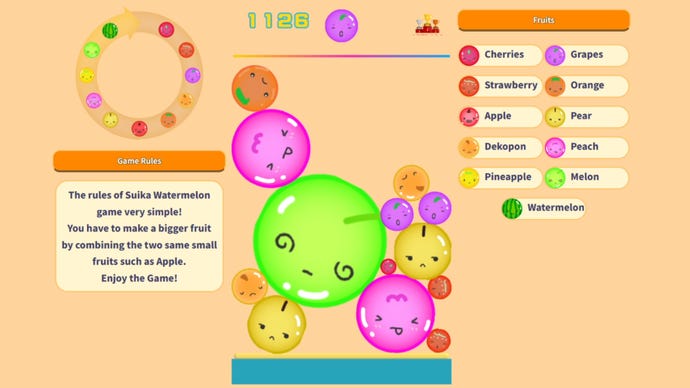
Suika, also known as the Watermelon Game, is like a cross between 2048 and Tetris, but with physics. You drop fruits into a container, and if two matching fruits touch, they combine into a bigger fruit. The aim is to reach the final fruit (watermelon) and/or last as long as possible before the fruit pile reaches the top of the container.
There are a couple of different ways to play the Suika game, and we’ll go over both of them below so you can try out the Watermelon Game for yourself and see what all the fuss is about! Fair warning - it’s annoyingly fun.
To see this content please enable targeting cookies.Manage cookie settings
To see this content please enable targeting cookies.Manage cookie settings
How to play Suika Game for free on PC
If you want to play Suika Game for free, then there is a browser version of the game available on PC. To try out the free version, go tosuikagame.comand start playing!
Bear in mind that the free version of Suika is a little different from the main version of the game on the Nintendo Store. Here are the main differences:
If you want to play the proper version of the Watermelon Game that you’ve seen streamers playing on Twitch, then you’ll need to download the Suika Game on Nintendo Switch.
Image credit:Rock Paper Shotgun/Aladdin X
How to play Suika Game on Nintendo Switch
You can play the real Suika Game on Nintendo Switch. To play Suika on Switch, carefully follow these steps:
It’s worth noting that 500 yen is actually more than you need to purchase the Suika Game. The game itself only costs 240 yen. Unfortunately, there’s no option to redeem a 240 yen voucher - the lowest amount you can get is 500 yen.
Don’t worry though, we’re not talking large sums of money. 240 yen is equal to around £1.32 / $1.60 / €1.51, and 500 yen is equal to around £2.75 / $3.34 / €3.16. It’s of course up to you to decide whether it’s worth overpaying slightly in order to easily get your hands on the yen you need to purchase the Watermelon Game.
That’s all you need to know in order to start playing Suika Game either on PC or on Nintendo Switch, as you prefer. Happy fruit-combining!
