HomeGuidesMinecraft: Dungeons
How to play Minecraft DungeonsLearn how everything works, from the camp to enchantments and artefacts
Learn how everything works, from the camp to enchantments and artefacts
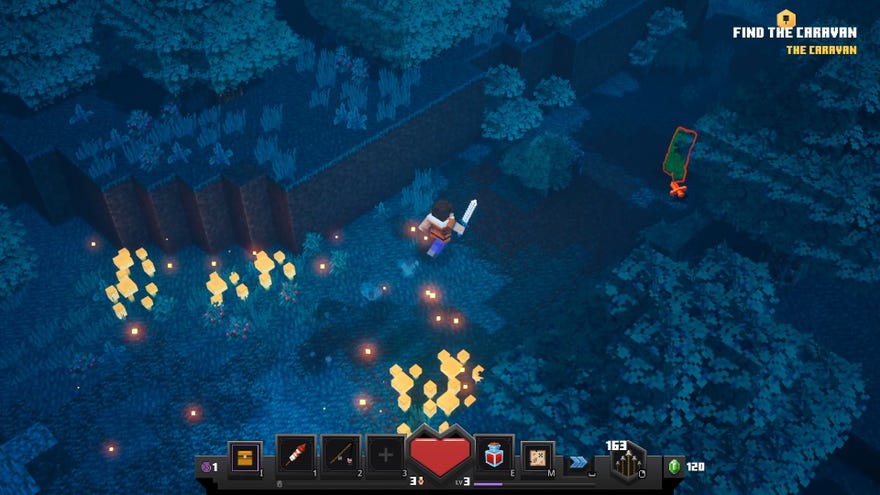
So you’ve bought Minecraft Dungeons but you don’t have the foggiest idea of how to play it. If you’re coming to this game from regular Minecraft, it’s got a familiar setting and characters, but that’s where the similarities end.
Don’t worry, if you’re stuck learning how to play Minecraft Dungeons we can teach you the basics.
How to play Minecraft Dungeons
Our guide onhow to play Minecraft Dungeonswill go through the basics. This includeslearning the controls and user interface(UI),how to use the inventory screen, andhow to use the camp to get better items.
Is Minecraft Dungeons free?
Minecraft Dungeons is available to buy on the Microsoft Store on Windows 10, or through theMinecraft Dungeons website. This version is compatible with Windows 7/8/10.
The Hero Edition of Minecraft Dungeons includes the main game, as well as the following items:
We do not know what the DLC packs will contain yet. Head to our Minecraft Dungeons DLC guide to keep up to date with all the DLC packs coming to the game.
If you have the Xbox Ultimate Game Pass, you can install the Hero Edition of Minecraft Dungeons right now, however the game won’t be available until May 26th, 2020 at 10:00 BST.
Minecraft Dungeons system specs
Information about Minecraft Dungeon’s system requirements is sadly rather vague on the official Microsoft Store page, and non-existent on the Minecraft Dungeons website.
We do have some idea of what the full minimum and recommended specs could be in the table below, though it doesn’t take into account the Windows 7 and Windows 8 versions.
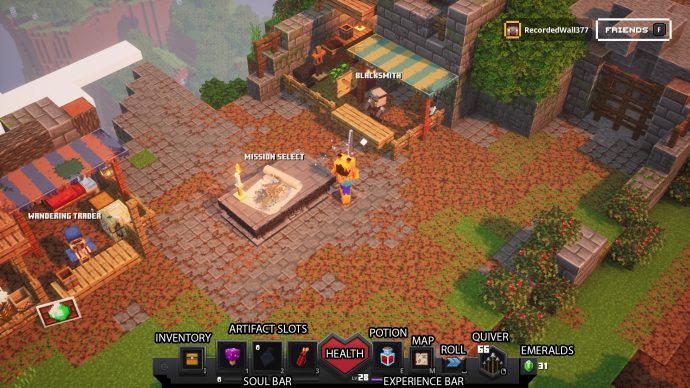
Minecraft Dungeons UI explained
The UI toolbar at the bottom of the screen has key information about your current health, items equipped to your item slots, and button shortcuts.
Health
Enemies can also drop certain items when killed. Some of these are healing items and when they are picked up, they can automatically regenerate your health for a short time.
Experience bar
At the bottom and to the right of the UI toolbar is the experience bar. This displays your hero’s current level and the purple bar shows the total experience you’ve accumulated towards the next level.
Soul bar
Lives
To the right of your Soul bar are the number of lives remaining. You start out with three per level.
Artifacts
The three boxes to the left of your heart are for equipping items, which are equipped via the inventory menu. To use an artifact once equipped, press the designated number key (1, 2, or 3) or controller button (X, Y, or B) for its slot. We’ll have a lot more information about what artefacts are available in ourMinecraft Dungeons artifactsguide.
Forward roll
You also have a forward roll. This can be used to dodge enemy attacks and clear gaps to find secret items. It’s worth noting that rolling has a 2.5 second cooldown, and that you will move more slowly until that cooldown wears off.
Ender Pearl
If you are playing multiplayer, you’ll also get an Ender Pearl. This is a reusable item that allows the user to reunite with another player. Push the right stick in on a controller, or press the F1 key to bring up the list of available players. Press the button associated with that player to teleport.
It will take a little bit of time, but it’s worth it to watch your hero wind their arm up like Marvel’s Thor winds up Mjolnir.
Quiver
Emeralds
Finally, to the right of this is a small green gem with a number beside it. This is the total number of emeralds - the game’s currency - that you currently have. You can carry an infinite amount of emeralds.
Minecraft Dungeons PC controls
Here are the default controls for Minecraft Dungeons if you are using a keyboard and mouse to play. If you have played Diablo,Path of Exile, or Torchlight before, the majority of these controls should be familiar to you.
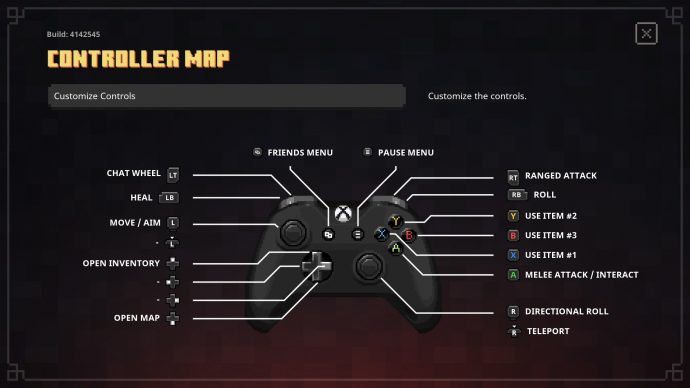
Minecraft Dungeons controller controls
For those who prefer to use a control pad to play games, Minecraft Dungeons features full controller support. The Xbox branded controllers are compatible right out of the gate, so just plug it in via USB and you’re good to go.
Here are the default controls for the Xbox controller:
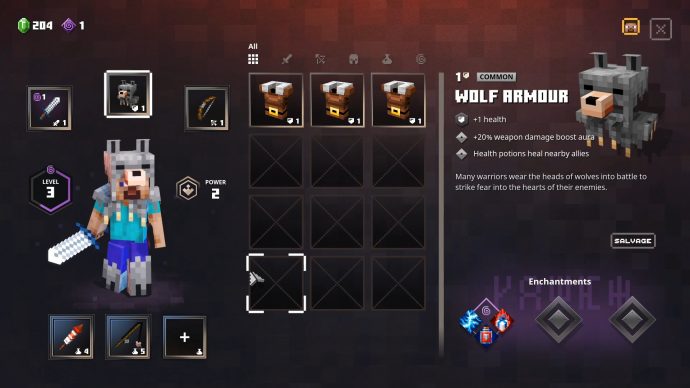
Managing your inventory in Minecraft Dungeons
The inventory screen in Minecraft Dungeons is where you can change your equipped gear. You can equip one melee weapon, one armor piece, one ranged weapon, and up to three artefacts equipped at any given time. Unlike similar games, Minecraft Dungeons doesn’t have an inventory limit, so you can hoard as many items as you wish. We don’t recommend doing this though, for reasons we’ll go into later.
How to use enchantment points in Minecraft Dungeons
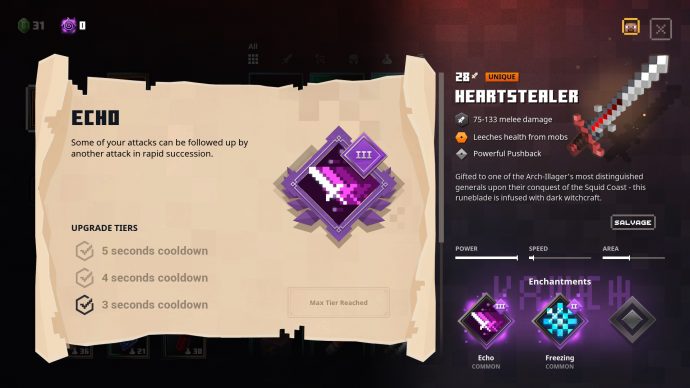
Every time you level up, you will get an enchantment point. These are used to upgrade items.
To spend an enchantment point, press the left mouse button or X button on the gear you wish to upgrade. This will give you the choice between randomised enchantments. Select one of them to apply that enchantment to the selected gear.
Once you’ve bought an enchantment, you’ll lock that choice in. From that point on, you’ll only be able to upgrade it to tier 2 and tier 3. The other choices for enchantments are unable to be selected. As for how many enchantment points this will cost you, it depends on the enchantment’s rarity, a breakdown of which is below:
Purchasing enchantments for your gear doesn’t mean you have to commit to using that item forever. You just need to salvage the item to get any enchantment points you spent on that item back. You’ll then be able to spend those enchantment points on newer, more powerful gear.
It’s also worth noting that some weapons and armor may have two or three options to choose between for each enchantment slot. Each one costs an enchantment point to choose it and these choices may give you an opportunity to nab some enchantments that have great synergy.
The enchantments in Minecraft Dungeons are not the same as those in Minecraft. We will be going over what every enchantment does in a lot more detail in ourMinecraft Dungeons enchantmentsguide.
Minecraft Dungeons camp area explained
Earlier in the guide, we alluded to the need to avoid hoarding items. The reason you don’t want to do this is because if you salvage your gear, the Blacksmith and Wandering Trader can give you versions of items that are more suited to your current progress in the game. This includes the highly sought after unique items, which you can learn about in ourMinecraft Dungeons unique itemsguide. To do that you’ll need emeralds, and what better way to get emeralds quickly than salvaging the redundant items in your inventory.
Minecraft Dungeons guide series
Thanks for reading our how to play Minecraft Dungeons guide. You’ll find plenty more guides for the game in the section below, so do check them out.
