HomeGuidesStarfield
How to install mods in StarfieldHere’s how to get started modding Starfield
Here’s how to get started modding Starfield
Image credit:Bethesda Game Studios
Image credit:Bethesda Game Studios
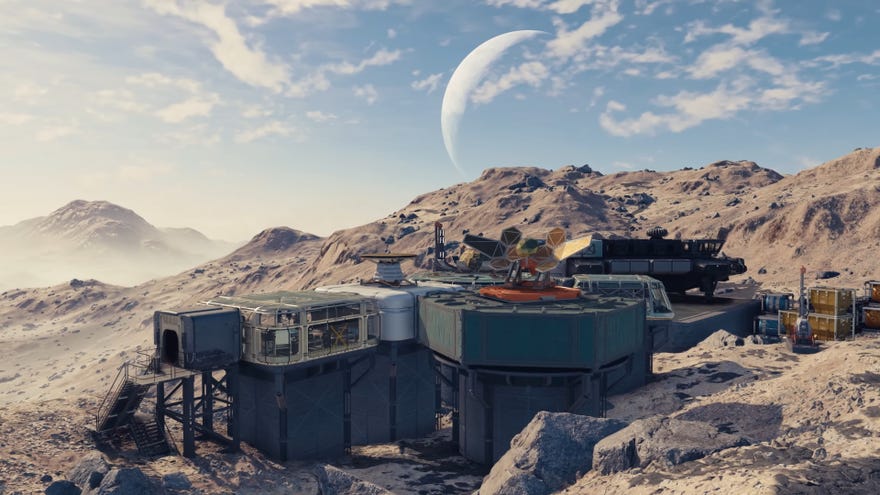
Want to learn how to install mods in Starfield?Being a BethesdaRPG, it was a foregone conclusion thatStarfieldwould have an absolutely massive modding community. Within a few days ofStarfield’s release there were already hundreds of mods gaining popularity on NexusMods, and more than enough material for us to compile our list of thebest Starfield modsso far.
To see this content please enable targeting cookies.Manage cookie settingsWas Starfield worth the wait? Liam and Alice B discuss this question - and more - in the video above.Watch on YouTube
To see this content please enable targeting cookies.Manage cookie settings
To see this content please enable targeting cookies.Manage cookie settings
How to install mods in Starfield
Once you have Vortex Mod Manager downloaded, follow these steps to install new Starfield mods:
Image credit:Rock Paper Shotgun/NexusMods
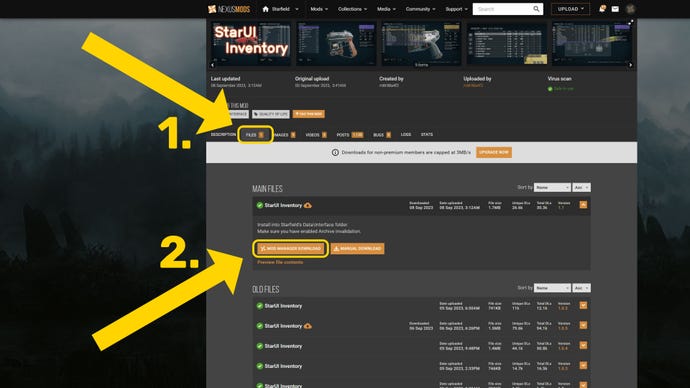
Image credit:Rock Paper Shotgun/Vortex Mod Manager
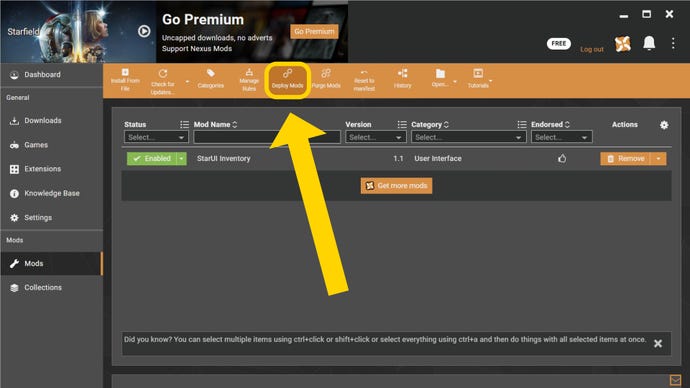
If Vortex asks you to help resolve two or more conflicting mods, don’t just give it your best guess as to which mod should take precedence. Go back to both the mod pages on NexusMods and read the Description tab to see what the mod makers have said on the topic.
How to set up Vortex Mod Manager for Starfield mods
To get Vortex Mod Manager ready for downloading Starfield mods, first you shoulddownload Vortex Mod Managerfrom NexusMods. Click “Download the latest version now”, then click “Manual Download”. Click past any “Additional files required” popups you get, and then select “Slow Download”. Within a few seconds, the download will begin.
Once Vortex Mod Manager is downloaded, launch it and follow the on-screen instructions to install it onto your PC. When you launch it for the first time, you’ll be asked tologin using your NexusMods account. If you don’t have one, create one now.
Once you’re logged in, click on “Games” on the left-hand side, search for “Starfield”, and click “Manage” on the Starfield icon. Download the prompted extension, and wait for Vortex to complete the installation. After that, follow the on-screen instructions to help Vortex find the game folder location (if it didn’t automatically find it for you).
Next, go to “Settings” and then “Mods”, and ensure that the folder location under “Mod Staging Folder (Starfield)” is located on the same drive that Starfield itself is installed on.
After that, Vortex Mod Manager is ready to start working its magic, and you can go back to the top of this page and follow the instructions we’ve laid out onhow to install mods in Starfield!
Image credit:Rock Paper Shotgun/NexusMods
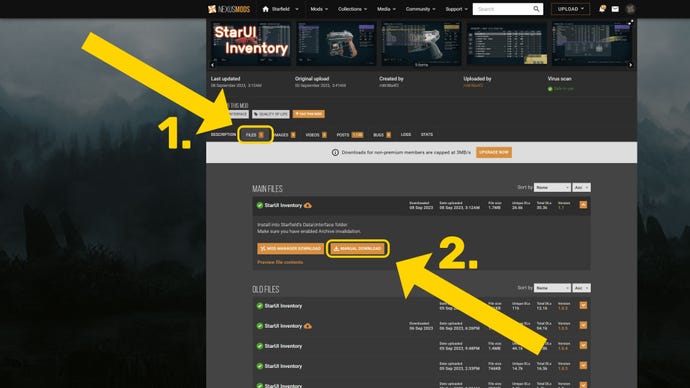
How to install Starfield mods manually
If you don’t want to use a mod manager like Vortex, you can still download and install Starfield mods manually. It’s only slightly slower than using a mod manager, although there is a greater risk of human error, so make sure you read the instructions carefully!
To install a Starfield mod manually, find the mod page on NexusMods, then click on the “Files” tab. Click the “Manual Download” button next to your desired version of the mod, and follow the on-screen instructions to download the mod.
But some mods may require extra steps, or for you to add the files to a different location altogether. So always read the individual mod instructions when manually downloading Starfield mods!
Once the mods are in the correct locations, close Windows Explorer and launch Starfield to play with your newly installed mods!
That’s all there is to downloading and installing a wide variety of Starfield mods in no time. If you want to change your game without resorting to modding, there’s an awful lot you can do with the rightStarfield console commandsandStarfield Item IDs. Or, if you’re not into cheating, check out our guides on thebest Starfield skillsto get first, and thebest Starfield buildsyou can create.
