HomeGuidesStarfield
How to horizontal boost in StarfieldLearn this hidden boosting trick in Starfield for extra speed
Learn this hidden boosting trick in Starfield for extra speed
Image credit:Rock Paper Shotgun/Bethesda Game Studios
Image credit:Rock Paper Shotgun/Bethesda Game Studios
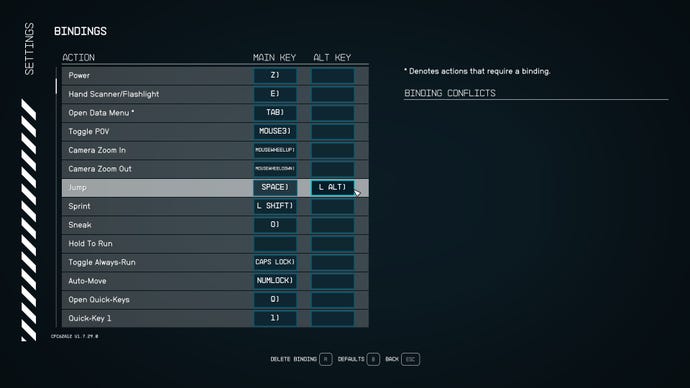
How do you horizontal boost in Starfield?You may be no stranger to the boost pack inStarfieldas an excellent way of getting around quickly while on the surface of a planet or moon; but did you know there’s a hidden trick that allows you to boost much further and faster?This trick is known as the horizontal boost, and to use it, you’ll need to configure a particular setting in-game. In this short guide we’ll explain exactlyhow to horizontal boost in Starfield, and the benefits of doing so.To see this content please enable targeting cookies.Manage cookie settingsWas Starfield worth the wait? Liam and Alice B discuss this question - and more - in the video above.Watch on YouTubeHow to horizontal boost in StarfieldBefore you can horizontal boost inStarfield, you first need to unlock theBoost Pack Trainingskill in theStarfield skill tree. Once you’ve unlocked this skill and equipped a pack that is capable of boosting, here’s how to horizontal boost in Starfield on PC:Open the pause menu and navigate to Settings, then Bindings.Find the Jump button, and set its second keybind to a key of your choice.Exit out of Settings and unpause the game.Jump and hit your chosen key in mid-air to horizontal boost.Image credit:Rock Paper Shotgun/Bethesda Game StudiosYou can only horizontal boost with a Standard or Skip boost pack.To check your boost pack type, just open your inventory, find your equipped boost pack, and check its name or the additional information at the bottom of the info panel on the right-hand side of the screen.The reason the horizontal boost is so effective is that, as the name suggests, the boost propels you horizontally, while the normal boost will give you more of an upward trajectory which is better for reaching high spots but worse for covering ground quickly. You’ll be doing a lot more of the latter than the former in Starfield, so the ability to horizontal boost is enormously useful.Can you horizontal boost on Xbox?Unfortunately, you cannot make use of the horizontal boost mechanic in Starfield while playing on Xbox. As the steps above show, you need to be able to rebind keys in order to horizontal boost, which isn’t available on Xbox. So only PC players can make use of this boosting technique.To see this content please enable targeting cookies.Manage cookie settingsTo see this content please enable targeting cookies.Manage cookie settingsNow that you know how to horizontal boost in Starfield, why not couple your newfound mobility with some added strength in other aspects of your character? We’ve got guides on thebest Starfield buildsandbest Starfield skills; or you can consult our primers onStarfield skill book locationsandhow to get rich quick in Starfield.
How do you horizontal boost in Starfield?You may be no stranger to the boost pack inStarfieldas an excellent way of getting around quickly while on the surface of a planet or moon; but did you know there’s a hidden trick that allows you to boost much further and faster?This trick is known as the horizontal boost, and to use it, you’ll need to configure a particular setting in-game. In this short guide we’ll explain exactlyhow to horizontal boost in Starfield, and the benefits of doing so.To see this content please enable targeting cookies.Manage cookie settingsWas Starfield worth the wait? Liam and Alice B discuss this question - and more - in the video above.Watch on YouTubeHow to horizontal boost in StarfieldBefore you can horizontal boost inStarfield, you first need to unlock theBoost Pack Trainingskill in theStarfield skill tree. Once you’ve unlocked this skill and equipped a pack that is capable of boosting, here’s how to horizontal boost in Starfield on PC:Open the pause menu and navigate to Settings, then Bindings.Find the Jump button, and set its second keybind to a key of your choice.Exit out of Settings and unpause the game.Jump and hit your chosen key in mid-air to horizontal boost.Image credit:Rock Paper Shotgun/Bethesda Game StudiosYou can only horizontal boost with a Standard or Skip boost pack.To check your boost pack type, just open your inventory, find your equipped boost pack, and check its name or the additional information at the bottom of the info panel on the right-hand side of the screen.The reason the horizontal boost is so effective is that, as the name suggests, the boost propels you horizontally, while the normal boost will give you more of an upward trajectory which is better for reaching high spots but worse for covering ground quickly. You’ll be doing a lot more of the latter than the former in Starfield, so the ability to horizontal boost is enormously useful.Can you horizontal boost on Xbox?Unfortunately, you cannot make use of the horizontal boost mechanic in Starfield while playing on Xbox. As the steps above show, you need to be able to rebind keys in order to horizontal boost, which isn’t available on Xbox. So only PC players can make use of this boosting technique.To see this content please enable targeting cookies.Manage cookie settingsTo see this content please enable targeting cookies.Manage cookie settingsNow that you know how to horizontal boost in Starfield, why not couple your newfound mobility with some added strength in other aspects of your character? We’ve got guides on thebest Starfield buildsandbest Starfield skills; or you can consult our primers onStarfield skill book locationsandhow to get rich quick in Starfield.
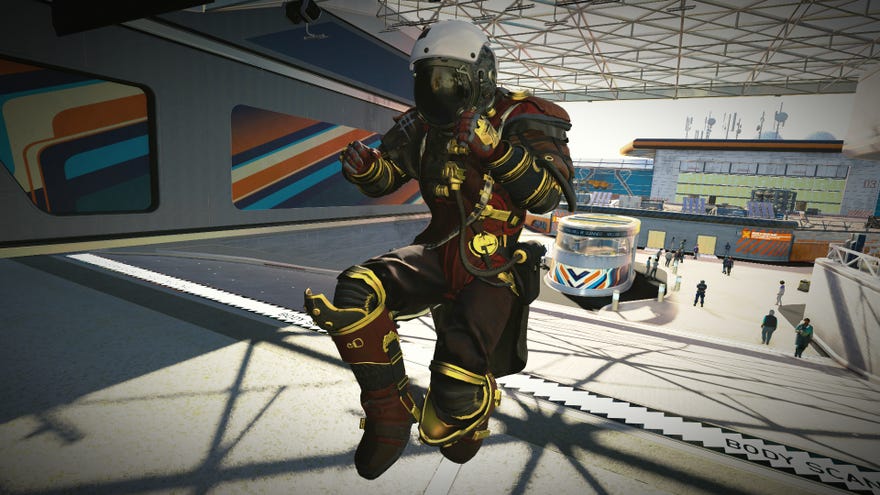
How do you horizontal boost in Starfield?You may be no stranger to the boost pack inStarfieldas an excellent way of getting around quickly while on the surface of a planet or moon; but did you know there’s a hidden trick that allows you to boost much further and faster?
This trick is known as the horizontal boost, and to use it, you’ll need to configure a particular setting in-game. In this short guide we’ll explain exactlyhow to horizontal boost in Starfield, and the benefits of doing so.
To see this content please enable targeting cookies.Manage cookie settingsWas Starfield worth the wait? Liam and Alice B discuss this question - and more - in the video above.Watch on YouTube
To see this content please enable targeting cookies.Manage cookie settings
To see this content please enable targeting cookies.Manage cookie settings
How to horizontal boost in Starfield
Before you can horizontal boost inStarfield, you first need to unlock theBoost Pack Trainingskill in theStarfield skill tree. Once you’ve unlocked this skill and equipped a pack that is capable of boosting, here’s how to horizontal boost in Starfield on PC:
Image credit:Rock Paper Shotgun/Bethesda Game Studios
You can only horizontal boost with a Standard or Skip boost pack.To check your boost pack type, just open your inventory, find your equipped boost pack, and check its name or the additional information at the bottom of the info panel on the right-hand side of the screen.
The reason the horizontal boost is so effective is that, as the name suggests, the boost propels you horizontally, while the normal boost will give you more of an upward trajectory which is better for reaching high spots but worse for covering ground quickly. You’ll be doing a lot more of the latter than the former in Starfield, so the ability to horizontal boost is enormously useful.
Can you horizontal boost on Xbox?
Unfortunately, you cannot make use of the horizontal boost mechanic in Starfield while playing on Xbox. As the steps above show, you need to be able to rebind keys in order to horizontal boost, which isn’t available on Xbox. So only PC players can make use of this boosting technique.
Now that you know how to horizontal boost in Starfield, why not couple your newfound mobility with some added strength in other aspects of your character? We’ve got guides on thebest Starfield buildsandbest Starfield skills; or you can consult our primers onStarfield skill book locationsandhow to get rich quick in Starfield.
