HomeHardwareFeatures
G-Sync vs FreeSync vs G-Sync Compatible: what you need to knowVariable refresh rate techs explained
Variable refresh rate techs explained
Take a look at ourbest gaming monitorrecommendations and you’ll find pretty much all of them have support for either AMD FreeSync or Nvidia’s G-Sync variable refresh rate technology. But what exactly is G-Sync and FreeSync and why are they so important for gaming? Below, you’ll find all the answers to your burning G-Sync FreeSync questions, including what each one does, how they’re different, and which one is best for your monitor and graphics card. I’ll also be talking about where Nvidia’s G-Sync Compatible standard fits in with all this, as well as what Nvidia’s G-Sync Ultimate, AMD’s FreeSync Premium and FreeSync Premium Pro specifications bring to the table as well.
NVIDIA G-SYNC: How It WorksWatch on YouTube
NVIDIA G-SYNC: How It Works
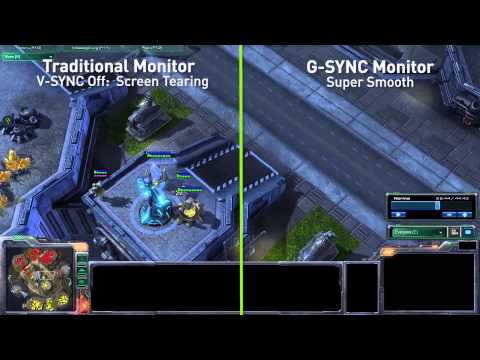
Unlike V-Sync, which is a similar technology you’ll often find in a game’s settings menu, G-Sync and FreeSync don’t add input lag, and they don’t force your GPU to stick to whatever your monitor’s refresh rate is - an approach that causes stuttering with V-Sync. Instead they adjust the refresh rate on the fly.
As such, it’s worth using one or the other, but Nvidia and AMD have tweaked their technologies over the years, adding new features and different tiers with varying capabilities. Which is best? It’s time to find out.
What is G-Sync?
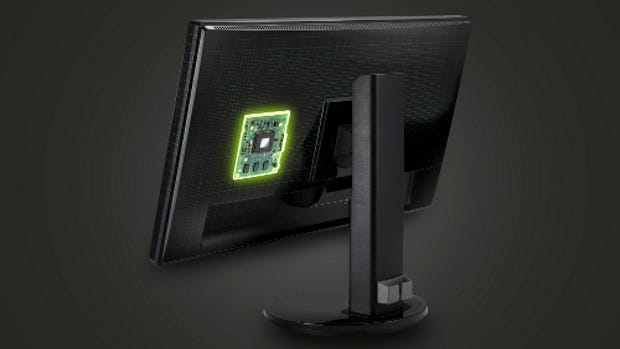
G-Sync is Nvidia’s variable refresh rate technology, and (unsurprisingly) requires an Nvidia graphics card in order to work. That’s generally not a problem, unless you were waiting for a lesser-spottedRTX 3080, but an even bigger problem might be how much thebest Nvidia G-Sync monitorstend to cost.
You see, whereas FreeSync piggy-backs off a monitor’s built-in DisplayPort 1.2 (and, more recently, HDMI) protocols, fully-fledged G-Sync monitors require a propriety processing chip, which pushes up the price. It’s a fixed standard, too, and G-Sync monitors have to undergo over 300 compatibility and image quality tests, according to Nvidia, before they can join the G-Sync club.
On the bright side, G-Sync monitors also support a wider range of features than the FreeSync stable, such as:
This is why you often only find G-Sync on higher-end monitors, as it’s simply not cost-effective to include it on cheaper ones. That said, since G-Sync is a fixed standard, you also know exactly what you’re getting whenever you buy a G-Sync enabled display: the effectiveness won’t be slightly different between monitors, as is the case with FreeSync.
G-Sync vs G-Sync Ultimate
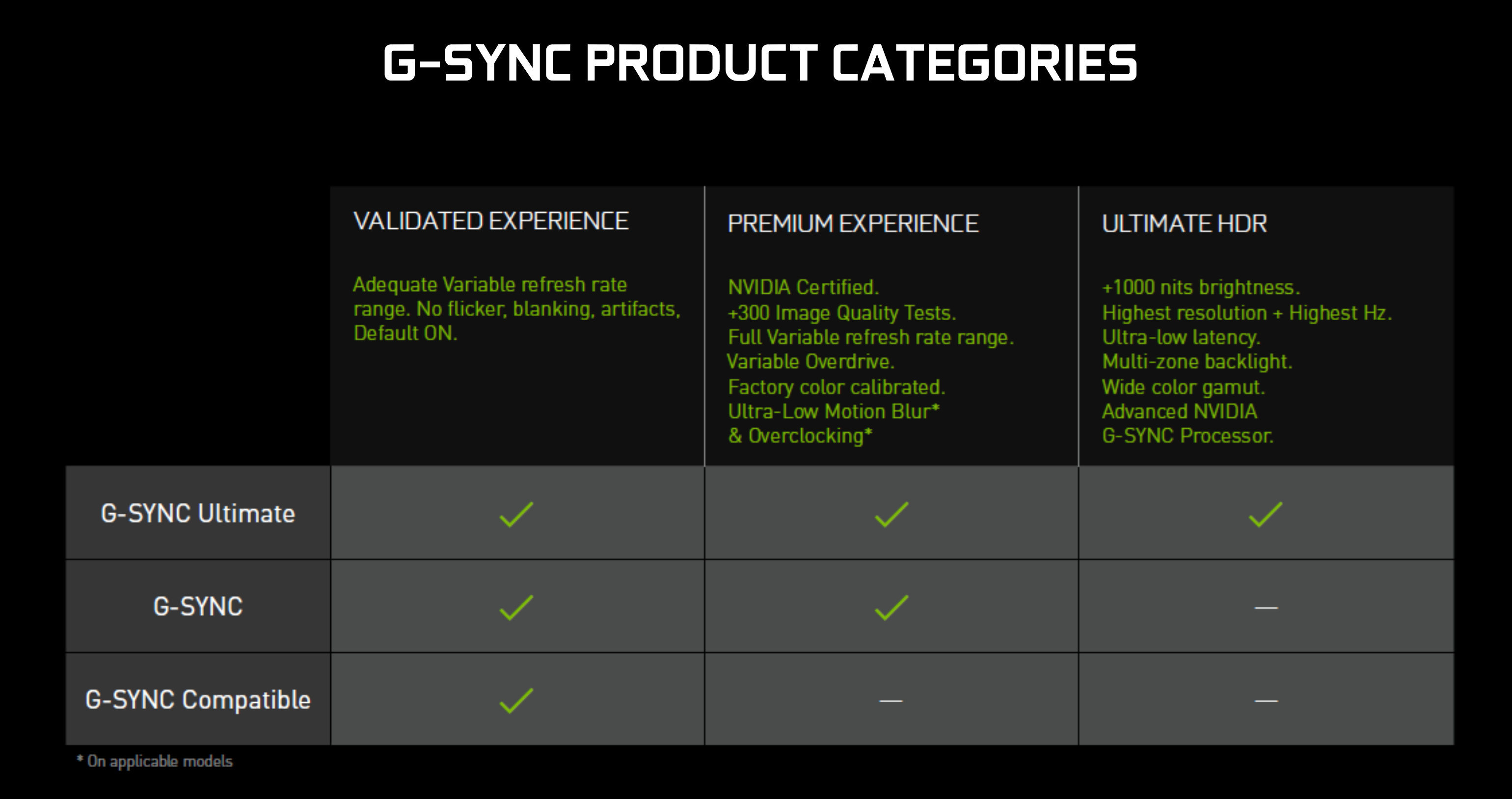
G-Sync Ultimate adds HDR support into the mix. You still get everything described above, but every G-Sync Ultimate screen also gets you the following monitor specifications:
G-Sync Ultimate monitors are much rarer than their standard G-Sync counterparts - naturally, given their higher specs and pricing - but but they encompass both regular desktop monitors, such as theAsus ROG Swift PG27UQandAcer Predator X27, as well asNvidia’s BFGD(or Big Format Gaming Display) screens such as theHP Omen X Emperium.
Here’s Nvidia’s own breakdown of their various G-Sync standards.
What is G-Sync Compatible?
If you’ve got an Nvidia card but no money left for a genuine, certified G-Sync display, all hope is not lost. The G-Sync Compatible label is given to AMD FreeSync monitors where Nvidia GPUs can essentially ride the coattails of FreeSync, granting you adaptive syncing via the onboard DisplayPort protocols instead of an expensive processor. Is it incredibly cheeky of Nvidia to borrow rival tech like this? A bit. Is it a bad deal for consumers? Nope.
That’s important, because while in theory any FreeSync monitor could support syncing with Nvidia graphics cards, in practice many – over 200, according to Nvidia – show signs of blanking, pulsing, flickering and other nasty-looking artefacts when they were put to the test. In other words, if you’re an Nvidia card owner looking to save cash on their next monitor, look out for the G-Sync Compatible label – or just check our list ofG-Sync Compatible monitors.
What is FreeSync?
AMD’s take on the whole variable refresh rate business, as we’ve mentioned, is based on the built-in adaptive sync protocol inside a monitor’s DisplayPort connection to deliver its dynamic refresh rates. It’s also been enabled over HDMI since it was first introduced, but it doesn’t require a special processing unit in order to work and there aren’t any licensing fees to include it on a monitor, either.
For starters, FreeSync’s variable refresh rate tech only works within a certain frame rate range. Some monitors have support for frame rates as low as 30fps, but most will only kick in if your frame rate is over 40fps, or even 48fps. That means that if your graphics card’s output drops below 30fps, 40fps, 48fps, or whatever the monitor’s lower limit is, FreeSync stops being effective and you don’t get any benefit whatsoever.
Some FreeSync monitors try to smooth out low-fps performance using something called Low Framerate Compensation, or LFC, which duplicates the number of frames being shown when they drop below a certain threshold – 30fps being bumped up to 60fps, for example. However, the monitor in question will need to have this feature built-in, so you may not find it on cheaper FreeSync models.
FreeSync vs FreeSync Premium vs FreeSync Premium Pro
Here’s the basics, though:FreeSyncis the lowest, most widely available standard, and works exactly as described a few paragraphs back.FreeSync Premiumis a newer standard, with certification requiring both the LFC feature as standard and a 120Hz refresh rate.
FreeSync Premium Pro also bundles in the benefits of the tiers below it, so you can be sure a monitor with this on the box will feature LFC and at least a 120Hz refresh rate.
G-Sync vs FreeSync: which is best?
The problem with G-Sync, though, is that it’s so damn expensive. It’s a hard sell at the best of times, and prices only get more expensive the further you move up the sizing scale. The inconvenience of trying to ascertain different monitors’ different FreeSync ranges is, comparatively, a small price to pay.
Of course, if you’re already a determined AMD GPU owner, you don’t have much of a choice in the first place, but for those with Nvidia cards the best solution would be to take the G-Sync Compatible route. Particularly if you’re not fussed about Ultra Low Motion Blur, or don’t play enough twitchy shooters to justify native G-Sync’s lower latency, it’s a good way to secure adaptive sync while also saving yourself a bundle.
It’s also future-proofed in the sense that your next graphics card can be either Nvidia or AMD, and you won’t miss out either way. And, while the number ofG-Sync Compatible monitorsisn’t the full 1309, there are still loads of options you can pick from.
