HomeHardwareFeatures
Best gaming mouse: the top wired and wireless gaming miceOur tried and tested gaming mouse picks
Our tried and tested gaming mouse picks
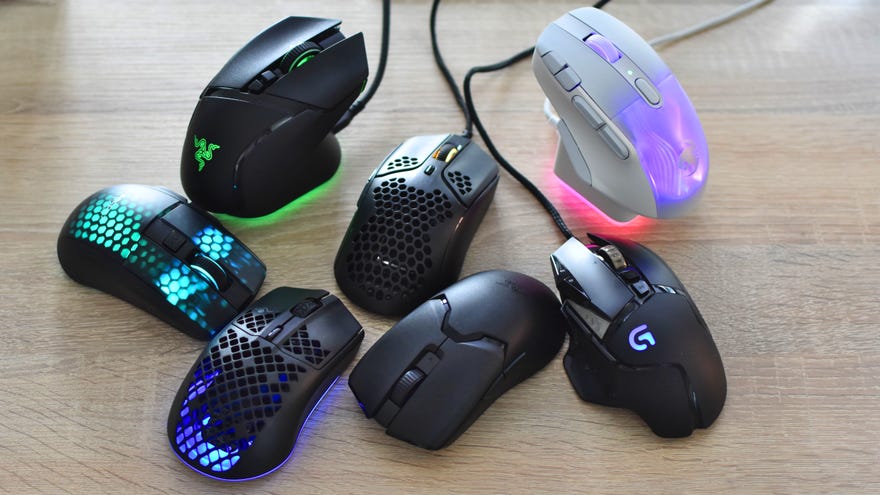
I always enjoy testing out new contenders for this best gaming mouse guide. Plenty of mice turn out to be common street rats, to be sure, but every now and then something comes along that works so well it feels like an extension of my own hand. Without the implicit body horror, obviously.
To see this content please enable targeting cookies.Manage cookie settings
To see this content please enable targeting cookies.Manage cookie settings
To see this content please enable targeting cookies.Manage cookie settings
But then, w go for a gaming mouse in the first place, when (possibly more affordable) office mice can swing a cursor around without any brash ‘gAm3rrr’ branding? Honestly, any mouse is fine for the average point-and-click orpuzzle game, though gaming mice often add some genuinely practical, some might even say sensible features. These can range from a wider array of rebindable buttons (especially handy forMMOs) to ergonomic upgrades, like widened thumb rests. And I know that RPS readers aren’t always madly in love with RGB lighting, but hey, you can always switch it off.
In any case, this guide aims to please a range of tastes. And, indeed, hand sizes. The other good news is that if one of our best gaming mouse picks is right for you, there’ll be no need to upgrade again for absolutely ages; mice are, like good keyboards or thebest gaming headsets, among the most timeless PC hardware upgrades you can make. Just look at the reader favourite Logitech G502, which has sat atop this list for bloomin’years.
Best gaming mouse
Logitech G502 Hero
The best gaming mouse overall
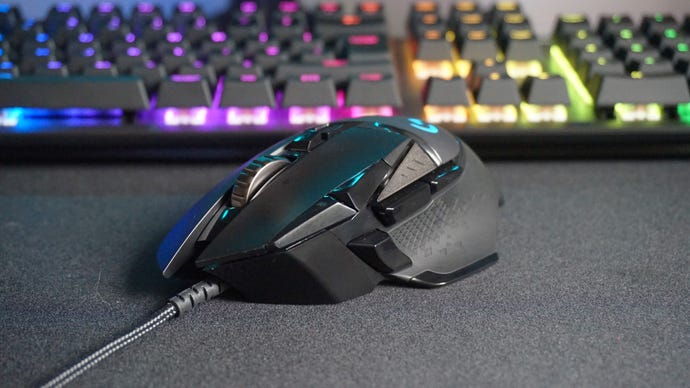
Back in the Before Times of 2019, RPS readers voted theLogitech G502as yourfavourite gaming mouse. Good choice - I use one regularly as part of the main RPS test rig. There’s just something so wonderfully complete about it: a sweet blend of comfort, features and tactility, with plenty of opportunities for customisation.
That extends from the removeable weights, which you can swap in and out to adjust how the G502 feels, to the support for multiple sensitivity/input/RGB lighting profiles. Speaking of which, the 11 programmable buttons and close to perfectly placed, ready to be pressed without straining a thumb but not intruding into normal digit-resting space. There’s even a satisfying robustness to their clicking action that you don’t always get elsewhere, even on Razer or SteelSeries’ best mice.
The slight hitch is that the originalProteusSpectrum model only seems available at bizarrely inflated prices. Luckily, you can get the newer G502 Hero – which is basically identical, save for an updated, more sensitive sensor – for much more reasonable money.
Read more in ourLogitech G502 Hero review
Razer Basilisk V3 Pro
The best premium gaming mouse
Image credit:Rock Paper Shotgun
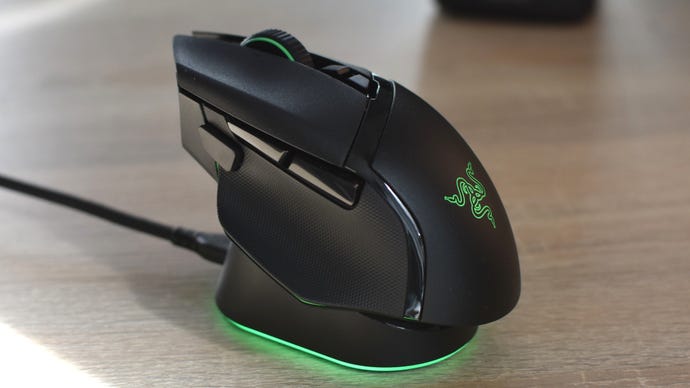
I’m almost loathe to replace theRazer Basilisk V3in this corner of the list, but look, theRazer Basilisk V3 Prois more or less the same mouse – just with wireless connectivity, a more sensitive optical sensor, and optional wireless charging support. This cutting of the cable doesn’t appear to have done performance any real harm, so even when I’m not on peripheral testing duty, it’s been the gaming mouse I’ve reached for – while the wired Basilisk V3 returns to the kit cupboard.
The Basilisk V3 Pro is a lot pricier than its wired counterpart, not to mention heavier, and if you want its wireless charger – the Razer Mouse Dock Pro – then that’s another big expense. Frankly, it’s a nice but unnecessary luxury, and at least with boring old cabled charging, you can keep using the mouse at the same time. And what a mouse this is: keenly sculpted to fit both palm and fingertip grips, with slip-proof textured rubber sections, tonnes of customisable buttons, solid-feeling optical switches, and a precise scroll wheel. This wheel also has a free-spinning mode, one of the Basilisk’s many similarities with the Logitech G502 series.
Logitech G203
The best cheap gaming mouse
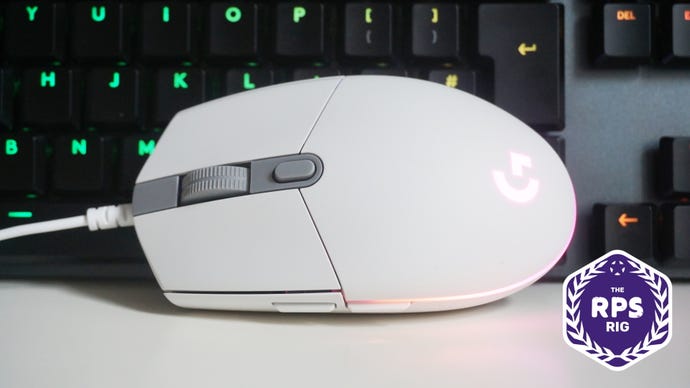
It’s reasonably small, but it’s also exceedingly light, making it feel lovely and smooth to move round your mouse mat. Nothing against larger mice, naturally, but they can be more of a chore to move quickly if you have small hands.
The G203 also has two extra side-buttons on the left hand side of the mouse, which can be programmed to do all sorts of diffferent functions. These include keyboard buttons, macros and media controls, and a dedicated DPI clutch / sniper button that lowers the mouse’s speed to whatever setting you like for as long as you hold it down - handy, if you’re into online competitive shooter games.
Read more in ourLogitech G203 Lightsync review
Logitech G Pro Wireless
The best wireless gaming mouse
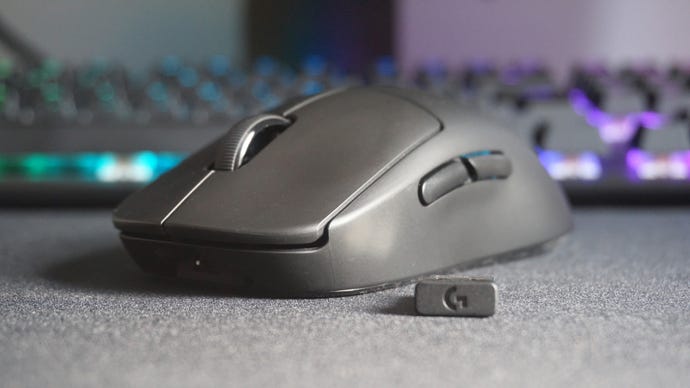
It’s getting on in years, but theLogitech G Pro Wirelessremains our top pick of the wireless mice. Thanks to sustained price drops, it’s much more affordable than it was at launch, and its specs and design still stand up against more recent competition. Which is to say, it’s wonderfully agile and super comfy to use, and at 80g it’s impressively lightweight as well (just not to the extent of the newer Logitech G Pro X Superlight 2 below). When you combine that featherlight nothingness with Logitech’s practically lag-free Lightspeed wireless tech and its brilliant Hero 16K sensor, the Pro Wireless is as hyper-competent a gaming mouse as it was in 2018.
It may not have a central DPI button like every other gaming mouse on the planet (it’s actually on the bottom of the mouse, for some incomprehensible reason), but Logitech’s intuitive Gaming Software tool gives you plenty of flexibility when it comes to customising its various buttons to suit your gaming habits. Whether you’re right or left-handed, you’ve got loads of options here, including being able to change your DPI or sensitivity setting on the fly for as long as you hold down your chosen button.
Read more in ourLogitech G Pro Wireless review
Logitech G Pro X Superlight 2
The best lightweight wireless gaming mouse
Image credit:Rock Paper Shotgun
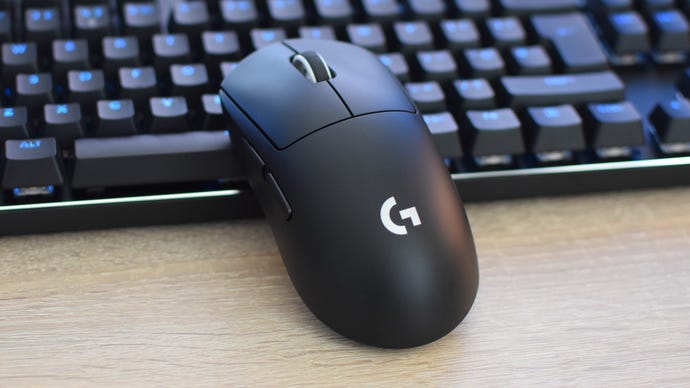
As much as theLogitech G Pro X Superlight 2resembles a barely-updated, right-hand-only G Pro Wireless, this mouse is full to bursting with upgraded tech and clever design touches. The sensor, for example, is a new version of the Hero sensor that can reach up to 32,000dpi, and even at much lower sensitivities it feels as unnervingly accurate as anything on the market. The hybrid optical-mechanic switches are fantastic as well, with just the right amounts of travel depth and clickiness – combined with Lightspeed wireless connectivity that near enough eliminates lag.
At 60g, it’s also tangibly lighter than the G Pro Wireless, and technically lighter than almost every other gaming mouse in this list. Even the scroll wheel is hollowed out to save weight, though thankfully this still has a stable, quiet spin to it. It’s absolutely not too flimsy, either. If anything, the build quality and massive non-stick feet give this mouse a stability that rivals much heavier ones.
The catch is a familiar one: the Pro X Superlight 2’s considerably higher price makes choosing between it and the older G Pro Wireless much harder than it would be otherwise. But the former’s upgrades, and generally smooth, extremely comfortable operation, earn it a place among the best.
Corsair Harpoon RGB Wireless
The best cheap wireless gaming mouse
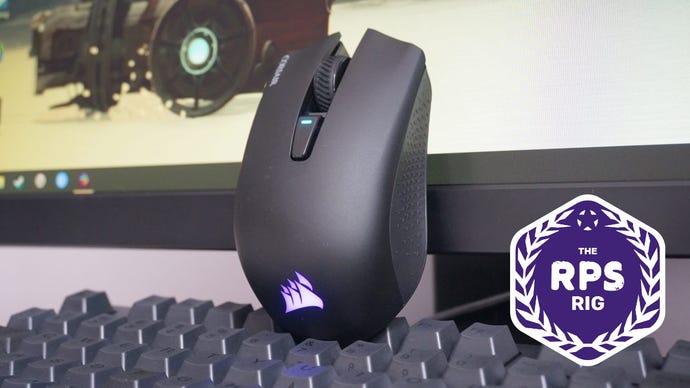
The excellentCorsair Harpoon RGB Wirelesscan be had for a whole lot less than the Clutch GM51 Lightweight Wireless. This is an absolute steal for those after an affordable wireless gaming mouse, and thanks to Corsair’s super fast Slipstream wireless technology, the Harpoon RGB Wireless feels just as nippy as its Logitech rival, making it great for gaming and general desktop duties alike.
The Harpoon Wireless has built-in low latency Bluetooth support as well, just in case you’ve got one too many 2.4GHz wireless devices getting in the way of things, but even in my many wireless device-ridden home it worked like an absolute dream.
Granted, that’s not enough to make it the best wireless mouse overall – battery life is shorter than on the Viper V2 Pro and Logitech G Pro Wireless, and the Harpoon RGB Wireless is heavier than both as well. Still, there’s a lot to like here besides all that, and you’ll be hard-pushed to find a more responsive mouse for less.
Read more in ourCorsair Harpoon RGB Wireless review
HyperX Pulsefire Haste 2
The best lightweight gaming mouse
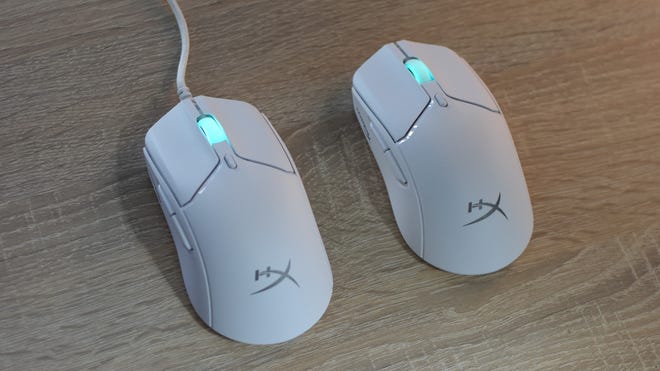
TheHyperX Pulsefire Haste 2is a replacement for one of my favourite ever lightweight gaming mice; I even gifted Ed a Pulsefire Haste the first time I met him. It’s time to move on, though, and while I’ll miss the bargain pricing of the original, the Pulsefire Haste 2 is a fantastically feathery mouse that will handle all but the most button-intensive MMOs.
It’s actually a few grams lighter than the Pulsefire Haste, even though it’s gone with a solid shell instead of keeping the previous holey design. This thing glides around like an air hockey puck, yet never feels delicate or poorly made, with crisp left/right click mechanisms and a pair of perfectly weighted thumb buttons. The only misjudgement is the slightly papery stick-on grips, but those are optional, and I’ve happily played on without them.
I’ve also used, and enjoyed, thePulsefire Haste 2 Wireless. This is more expensive and lacks the 8000Hz polling option that the wired model has, but otherwise, they’re close enough to identical. It’s also easily one of the lightest wireless gaming mice I’ve tried, at just 61g.
Corsair Ironclaw RGB
The best gaming mouse for big hands
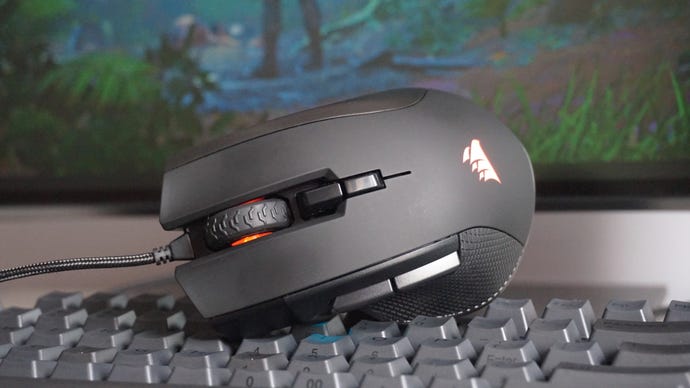
For those after a great mouse that doesn’t break the bank and offers loads of extra features, it simply doesn’t get much better than theCorsair Ironclaw RGB. Not only is its large, contoured shape very comfortable to use over periods of time, but its weight of 105g and responsive sensor make it lovely and fast in the hand, too.
The Ironclaw RGB also offers more functionality than the mildly equally unassumingSteelseries Rival 310. The Rival 310 is still a great choice for those looking to keep costs down (as is the identicalSensei 310if you’re looking for a cheap ambidextrous mouse), but the Ironclaw does a lot more for the money, such as giving you an extra DPI or sensitivity profile to play with, a braided USB cable, seven programmable buttons instead of six, and the ability to turn one of those buttons into a ‘sniper’ button for on-the-fly DPI adjustments to give you better control when lining up shots inFPS games. All in all, it’s a great value mouse.
Read more in ourCorsair Ironclaw RGB review
SteelSeries Aerox 3 / SteelSeries Aerox 3 Wireless
The best gaming mice for small hands
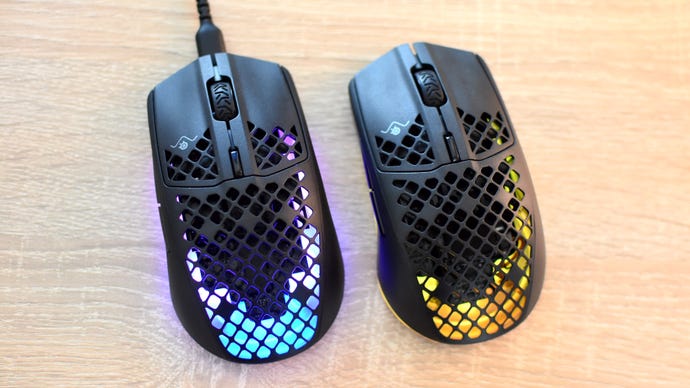
I, uh, do not have small hands. I fact I have quite large hands, the kind that create logistical problems when installing M.2 SSDs or eating Pringles. Yet even I can see the petite appeal of theSteelSeries Aerox 3and its cable-cutting variant, theAerox 3 Wireless.
Weighing just 57g and 66g respectively, these are some of the lightest, easiest-to-shift gaming mice around, and at 120mm long they’re compact without being too small for a comfortable grip. The Swiss cheese styling won’t be to everyone’s tastes, and could risk turning the Aerox 3 twins into piggy banks for dust if you don’t keep your desk clean, but the holes do help keep the weight down – as well as show off the onboard lighting. Don’t worry about the effect on build quality, either, as there’s no flexing or creaking around the more skeletal bits.
In fact, toughness is the Aerox 3’s party trick, as both models mice are water- and dust-resistant to the IP54 standard. That means the electronics are protected against solid muck ingress as well as slight splashes of liquid, a claim that held up in my testing. I chucked water and soft drinks at the Aerox 3 Wireless, and it always worked fine after drying off.
Roccat Kone XP Air
The best MMO gaming mouse
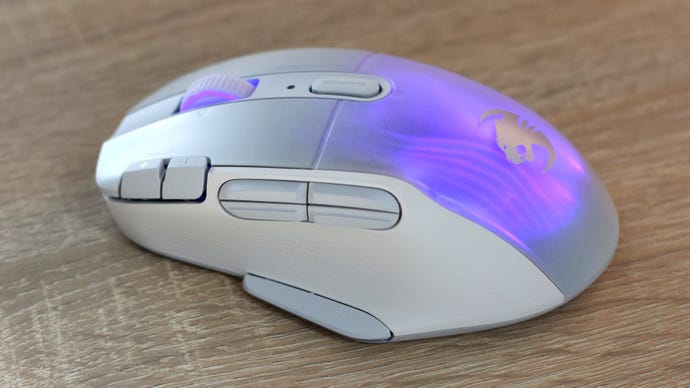
MMO mice tend to look more like theRazer Naga Trinity(£50/$79), with its great wall of thumb buttons, than the Roccat Kone XP Air. This initially appears to be more of a general-purpose, if still higher-end gaming mouse in the Logitech G502/Razer Basilisk vein.
Razer Viper
The best ambidextrous gaming mouse
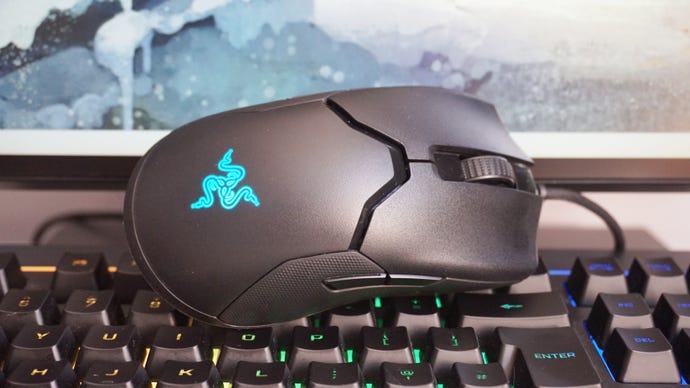
The originalRazer Viperis an excellent ambidextrous gaming mouse - particularly now it’s much cheaper than it used to be. We recommended theAsus ROG Pugioas well as the Viper due to their wildly different prices in the UK and US, but with Pugio stock levels getting lower and lower and prices going higher and higher as a result, it’s now nowhere near as good value as its Razer rival.
Read more in ourRazer Viper review
Gaming mouse jargon buster
DPI:This stands for “Dots Per Inch”. It’s used to measure a gaming mouse’s sensitivity. The higher the DPI number, the more sensitive your gaming mouse will be.
Polling rate:How many times the mouse communicates its position to your PC, per second. A 500Hz polling rate, for example, would report 500 times each second. Gaming mice generally target the 500-1000Mhz range, and there’s no real benefit to going higher than this, though cursor movements might not feel as smooth if you manually lower the polling rate below 400MHz or so.
Sniper button:A button that can change a mouse’s DPI speed on the fly when it’s being held down, often to a very low DPI to help players track headshots in competitive FPS games. Sometimes mice will have dedicated sniper buttons, while others will let you program this feature onto one of the side buttons.
Claw grip:A type of mouse grip that involves resting your palm on the back of the mouse and bending your index and middle fingers into a claw-like shape so the tips of them rest on the main right and left buttons. Professional players often say this allows for quicker, more precise mouse movements, and some mice will be designed with this grip in mind. In everyday use, though, it’s very uncomfortable.
Fingertip grip:Another type of mouse grip. This involves using a similar pose to the claw grip, only here your palm sits on your mouse mat, not the back of the mouse. It supposedly makes for faster mouse movements, as you’re only moving it with your fingers rather than your whole hand or arm. If you favour this grip, you’ll probably want a mouse with extra grippy sides.
Palm grip:This style of mouse grip involves resting your entire hand on the mouse. It’s a lot more relaxed than the claw and fingertip grip, and is better for large hand / arm movements. It’s probably how you’re holding your mouse right now.
