HomeGuidesAssassin’s Creed: Valhalla
Assassin’s Creed Valhalla nudity option: how to turn nudity on and offHere’s how to access the nudity option in Assassin’s Creed Valhalla.
Here’s how to access the nudity option in Assassin’s Creed Valhalla.

Assassin’s Creed Valhallahas a lot of options allowing you to customise your experience. You can toggle blood, opt for dismemberments and gore, and evenswitch nudity on and off. Whether you want to have nudity on or not (that’s your business), we figured we’d show you how to find it in the options menus. Let’s take a look.In this Assassin’s Creed Valhalla guide:Assassin’s Creed Valhalla nudity option: how to turn nudity on and offWhen does the nudity setting apply?Watch on YouTubeAssassin’s Creed Valhalla nudity option: how to turn nudity on and offTo turn nudity on or off in Assassin’s Creed Valhalla just head to the main menu. Now select ‘options’. The nudity option is under the ‘Gameplay’ tab. Just select it to turn it on or off.When does the nudity setting apply?Nudity isn’t particularly prevalent in AC: Valhalla, so you’re unlikely to run into it very often at all. Certainromance sequencesinvolve some, and there are some areas where NPCs may be nude depending on what your settings are. The setting will apply immediately, so you can toggle it on and off whenever you want.If you’re looking for more help with Assassin’s Creed Valhalla, be sure to check out ourWalkthrough.Once you’re done with that,read our thoughts on in-game settlement.
Assassin’s Creed Valhallahas a lot of options allowing you to customise your experience. You can toggle blood, opt for dismemberments and gore, and evenswitch nudity on and off. Whether you want to have nudity on or not (that’s your business), we figured we’d show you how to find it in the options menus. Let’s take a look.In this Assassin’s Creed Valhalla guide:Assassin’s Creed Valhalla nudity option: how to turn nudity on and offWhen does the nudity setting apply?Watch on YouTubeAssassin’s Creed Valhalla nudity option: how to turn nudity on and offTo turn nudity on or off in Assassin’s Creed Valhalla just head to the main menu. Now select ‘options’. The nudity option is under the ‘Gameplay’ tab. Just select it to turn it on or off.When does the nudity setting apply?Nudity isn’t particularly prevalent in AC: Valhalla, so you’re unlikely to run into it very often at all. Certainromance sequencesinvolve some, and there are some areas where NPCs may be nude depending on what your settings are. The setting will apply immediately, so you can toggle it on and off whenever you want.If you’re looking for more help with Assassin’s Creed Valhalla, be sure to check out ourWalkthrough.Once you’re done with that,read our thoughts on in-game settlement.
Assassin’s Creed Valhallahas a lot of options allowing you to customise your experience. You can toggle blood, opt for dismemberments and gore, and evenswitch nudity on and off. Whether you want to have nudity on or not (that’s your business), we figured we’d show you how to find it in the options menus. Let’s take a look.
In this Assassin’s Creed Valhalla guide:
Watch on YouTube
Watch on YouTube

Assassin’s Creed Valhalla nudity option: how to turn nudity on and off
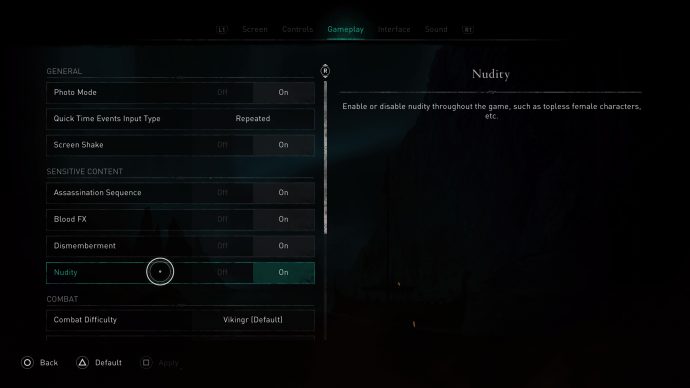
To turn nudity on or off in Assassin’s Creed Valhalla just head to the main menu. Now select ‘options’. The nudity option is under the ‘Gameplay’ tab. Just select it to turn it on or off.
When does the nudity setting apply?
Nudity isn’t particularly prevalent in AC: Valhalla, so you’re unlikely to run into it very often at all. Certainromance sequencesinvolve some, and there are some areas where NPCs may be nude depending on what your settings are. The setting will apply immediately, so you can toggle it on and off whenever you want.
If you’re looking for more help with Assassin’s Creed Valhalla, be sure to check out ourWalkthrough.Once you’re done with that,read our thoughts on in-game settlement.
