HomeGuidesPath of Exile
All chat commands and how to turn off chat in Path Of ExileAll the commands you could want.
All the commands you could want.
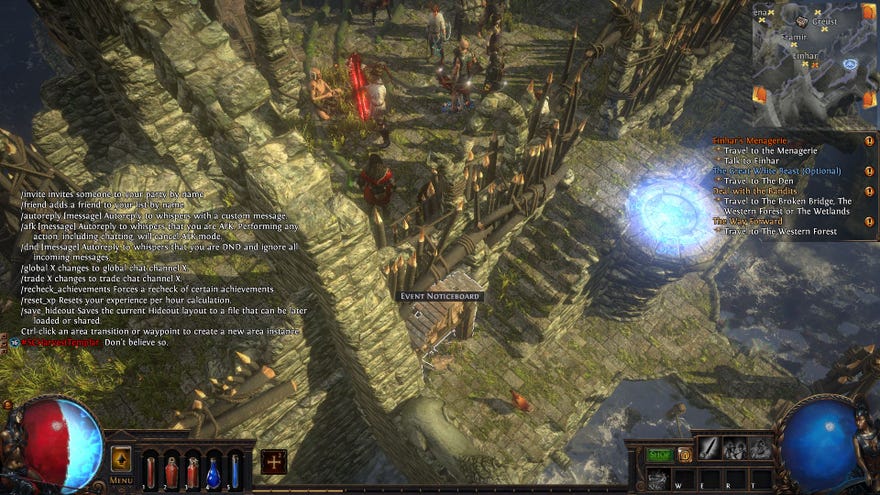
Path of Exile’s chat system allows players to talk to one another easily and without barriers. There’s all kinds of ways to chat to fellow Path of Exile players, including the ability to communicate with players throughout the world and console commands to help you tweak all sorts of stuff.
In this guide you’ll learn how to use commands and communicate with players in Path Of Exile.
Top 13 Best RPGs to Play on PCWatch on YouTube
Top 13 Best RPGs to Play on PC

How to use commands in Path Of Exile
To type in the Global chat you’ll need to begin your message with a #, which is automatically added when you select the ‘Global’ option to the left of the text box. The same is true of all the other kinds of chat - see the list below for prefixes to use for each type of chat.
Global is for general conversation with other Path Of Exile players when you’re traversing the land. Trade is another important one, as it lets you offer and accept items for trade with other players (at your own risk). To message a specific player, type their username after the @ suffix and only they will see your message.
Chat Commands
The chat box lets you input various commands to use for a number of helpful reasons, from party management to stats and silly little tidbits. Here’s a list of commands and what they do - they all start with a slash (/), and if you’re in-game you can always input ‘/help’ to get a fairly comprehensive list. Here’s every possible input though, thanks to the folks over at thePath Of Exile Wiki.
